Stock Depreciation Journal
This page describes the Stock Depreciation Journal report in the Stock module.
---
The Stock Depreciation Journal is a list of selected records in the Stock Depreciation register.
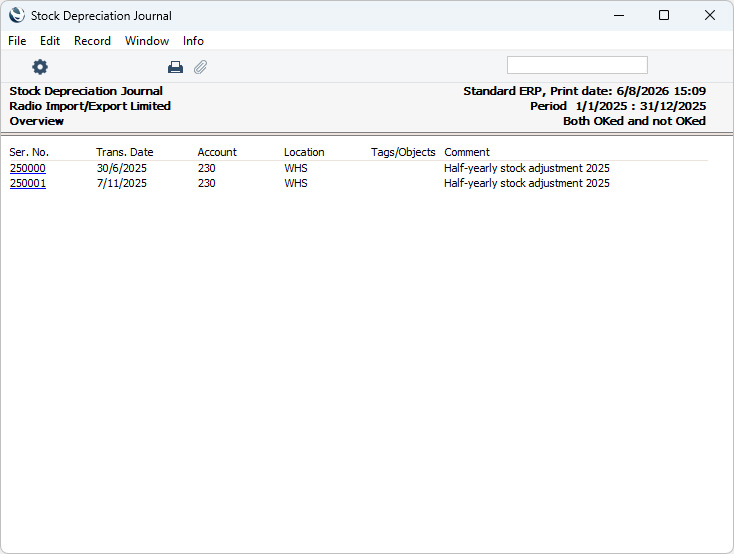
When printed to screen, the Stock Depreciation Journal has the Standard ERP Drill-down feature. Click (Windows/macOS) or tap (iOS/Android) on any Stock Depreciation Number to open the corresponding Stock Depreciation record.
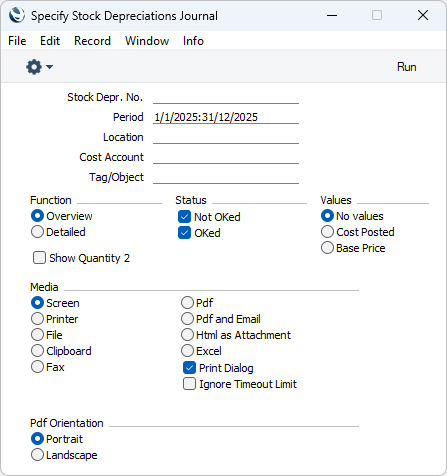
- Stock Depr. No.
- Range Reporting
Numeric
- Enter a Stock Depreciation Number or a range of Numbers separated by a colon (:) here if you would like specific Stock Depreciation records to be shown in the report.
- Period
- Paste Special
Reporting Periods setting, System module
- Enter the start and end dates of the period to be covered by the report. The report will list Stock Depreciation records with Trans. Dates falling within the period that you specify here.
- Location
- Paste Special
Locations setting, Stock module
- Range Reporting Alpha
- To report on Stock Depreciations that relate to a particular Location, specify that Location here. You can also enter a range of Locations separated by a colon (:).
- Cost Account
- Paste Special
Account register, Nominal Ledger/System module
- Range Reporting Alpha
- To report on Stock Depreciations that debit a particular Account, enter the Account Number here. This refers to the Cost Accounts entered in the headers of Stock Depreciation records, not to any that you may have entered in the rows.
- Tag/Object
- Paste Special
Tag/Object register, Nominal Ledger/System module
- If you need the report to list Stock Depreciations with a particular Tag/Object, enter that Tag/Object here. If you enter a number of Tags/Objects separated by commas, the report will only include Stock Depreciations featuring all the Tags/Objects that you have listed. If you enter a number of Tags/Objects separated by plus signs (+), Stock Depreciations featuring at least one of the Tags/Objects listed will be shown in the report. If you enter a Tag/Object preceded by an exclamation mark (!), Stock Depreciations featuring any Tag/Object except the one listed will be included in the report.
- For example:
- 1,2
- Includes Stock Depreciations with Tags/Objects 1 and 2 (including those with Tags/Objects 1, 2 and 3).
- 1+2
- Includes Stock Depreciations with Tags/Objects 1 or 2.
- !2
- Includes all Stock Depreciations except those with Tag/Object 2.
- 1,!2
- Includes Stock Depreciations with Tag/Object 1 but excludes those with Tag/Object 2 (i.e. Stock Depreciations with Tags/Objects 1 and 2 will not be included). Note the comma before the exclamation mark in this example.
- !1,!2
- Includes all Stock Depreciations except those with Tag/Object 1 or 2 or both. Again, note the comma.
- !(1,2)
- Includes all Stock Depreciations except those with Tag/Object 1 and 2 (Stock Depreciations with Tags/Objects 1, 2 and 3 will not be included).
- !1+2
- Includes Stock Depreciations without Tag/Object 1 and those with Tag/Object 2 (Stock Depreciations with Tags/Objects 1 and 2 will be included).
- (1,2)+(3,4)
- Includes Stock Depreciations with Tags/Objects 1 and 2, and those with Tags/Objects 3 and 4.
- 1*
- Includes Stock Depreciations with Tags/Objects beginning with 1 (e.g. 1, 10, 100).
- 1*,!1
- Includes Stock Depreciations with Tags/Objects beginning with 1 but not 1 itself.
- *1
- Includes Stock Depreciations with Tags/Objects ending with 1 (e.g. 1, 01, 001).
- 1*,*1
- Includes Stock Depreciations with Tags/Objects beginning and ending with 1.
- This refers to the Tags/Objects entered in the header of the Stock Depreciation records, not to any that you may have entered in the rows in a Stock Depreciation record.
- Function
- Use these options to specify the level of detail that you need to be shown in the report.
- Overview
- This choice produces a report with a single row for each Stock Depreciation record, showing Stock Depreciation Number and Date, Cost Account (from the header of each record), Location, Tags/Objects (also from the header of each record) and Comment. Depending on which Values option below you have chosen, total cost or sales values of each Stock Depreciation will also be shown.
- Detailed
- As well as the information shown in the Overview, this report lists each Item in each Stock Depreciation record individually, showing the Item Number and Name, Unit, Cost Account and Tags/Objects (both from the row), Quantity and cost or sales value (depending on which Values option below you have chosen).

- Status
- Use these options to specify whether Stock Depreciation records that have or have not been marked as OK or both are to be included in the report.
- Values
- Select one of these options to specify whether any values are to be printed in the report.
- No values
- No values will be printed in the Overview version of the report, while total values calculated from flip C of each Stock Depreciation row will be printed in the Detailed report..
- Cost Posted
- FIFO values from flip C of each Stock Depreciation row will be printed in both versions of the report.
- Base Price
- Base Prices from flip D of each Stock Depreciation row will be printed in both versions of the report.
- Show Quantity 2
- Select this option if you need to express stock quantities using two different units of measurement (for example, litres and gallons). Quantity 2 figures will only be shown for Items that have a Unit 2 and a Unit Coefficient specified on their 'Stock' cards. Please refer to the description of the Unit 2 and a Unit Coefficient fields here for more details.
---
Go back to:
|


 Introduction to Reports in the Stock Module
