Base Price Change
This page describes the Base Price Change form in the Stock module.
---
The Base Price Change form allows you to print records in the Base Price Changes setting in batches.
You can also print an individual Base Price Change record by opening the record and clicking the Printer icon Windows/macOS) or selecting 'Print' from the File menu (all platforms). To print a Base Price Change record to screen, click the Preview icon (Windows/macOS only).
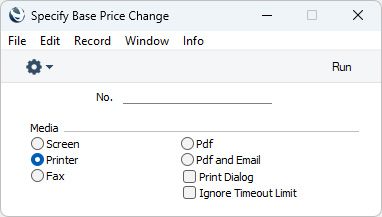
- No.
- Range Reporting
Numeric
- Enter a Base Price Change record number to print a single record, or a range of numbers separated by a colon (:). You must enter a number or range of numbers: if you leave this field empty, no forms will be printed.
You can use the following fields when you design the Form Template to be used by the Base Price Change form:
Header Fields
These fields will be printed once per Base Price Change record.
| Field in Form Template | Prints (from Base Price Change record) |
| |
| Comment | Comment. This information will be printed on separate lines, so you should specify a Line Height for this field |
| Difference Total | Sum of the values in the "Price Difference" row field |
| Document Type | Prints the phrase "Base Price Change" |
| Employee Name | Name from the relevant Person record |
| Serial Number (Number Series) | No. (i.e. Number of the Base Price Change record) |
| Signature | Person |
| Total Base price after incl. VAT | Sum of Sales Sum Incl. VAT in each row (on flip B) |
| Total Base price incl. VAT | Sum of (Qty * (Before + VAT)) in each row (if prices do not include VAT) or Sum of Sales Price Incl. VAT in each row (on flip B, otherwise) |
| Total Price | Total (i.e. Sum of Before in each row) |
| Total Quantity | Tot. Qty. |
| Total Sum Difference | Sum of (After - Before) in each row. This figure may therefore include or exclude VAT, depending on the Incl. VAT check box in the record being printed |
| Transaction Date (transdate) | Trans. Date |
Row Fields
Row fields will be printed once per row, so remember to specify a Line Height in each one and to set the Format to "Matrix".
| Field in Form Template | Prints (from Base Price Change record) |
| |
| Base price after incl. VAT | Sales Price Incl. VAT (from flip B) |
| Base price incl. VAT | Before + VAT (if prices do not include VAT) or Before (otherwise) |
| Description 1 | Description (i.e. Name of the Item) |
| Item Barcode BC39 | Barcode from the Barcodes setting in the Stock module, or Barcode or Item Number from the Item record, printed using the Code 39 barcode format. You should give this field a Style that uses a Code 39 barcode font |
| Item Barcode EAN 13 | Barcode from the Barcodes setting in the Stock module, or Barcode or Item Number from the Item record, printed using the EAN 13 barcode format. You should give this field a Style that uses an appropriate EAN 13 barcode font |
| Item Code | Item (i.e. Item Number |
| Price, row | Before (i.e. Base Price before the change) |
| Price Difference | Sales Sum Incl. VAT (from flip B) - (Qty * (Before +VAT)) ((if prices do not include VAT) or Sales Sum Incl. VAT (from flip B) - (Qty * Before) (otherwise) |
| Quantity | Qty |
| Row Base price after incl. VAT | Sales Sum Incl. VAT (from flip B) |
| Row Base price incl. VAT | (Qty * Before) + VAT (if prices do not include VAT) or Qty * Before (otherwise) |
| Row Sum | After (i.e. Base Price after the change) |
| Serial Number | Serial No |
| Sum, base price | Qty * Before |
| Sum, base price new | Qty * After |
| Total Row Total | Qty * (After - Before) |
| Transaction Number | Row number |
| Unit | If the Item has a Unit, the Comment from the relevant record in the Units setting or, if blank, the Unit Code |
| VAT Code | V-Cd |
| VAT Value, row | VAT Sum (from flip B) |
---
Go back to:


 Introduction to Forms in the Stock Module
