Introduction to Maintenance in the Nominal Ledger
Maintenance functions allow you to carry out certain updating tasks, usually involving batch processing and encompassing all or many of the records in the affected register. There are eleven such functions available in the Nominal Ledger. To use one, ensure you are in the Nominal Ledger and click the [Routines] button in the Master Control panel. Then click the [Maintenance] button in the subsequent window. The following window appears: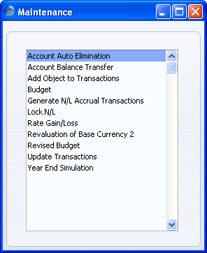
Account Auto Elimination
Please click here for details of this function.Account Balance Transfer
Please click here for a description of this function.Add Object to Transactions
This function adds an Object to every Transaction row.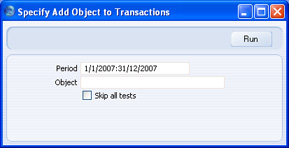
- Period
- Paste Special
Reporting Periods setting, System module
The Object specified below will be added to every row in every Transaction whose Date falls in the period specified here. If the period begins before the Lock Transaction date in the Locking setting in the System module, Transactions from that date or earlier will not be updated.
- Object
- Paste Special
Object register, Nominal Ledger/System module
- Specify the Object that you want to be added to every Transaction row. If you do not specify an Object, the function will have no effect.
- Skip all tests
- By default, the function will not add an Object to a Transaction row that already has an Object belonging to the same Object Type, and it will not add closed or non-existent Objects to any Transaction row. These checks can be time-consuming in larger databases. If you do not want them to be carried out, use this option. The function will not add the Object to a Transaction row that already has the Object, irrespective of whether you are using this option.
Create N/L Transactions
The 'Create N/L Transactions' Maintenance function is located in the System module and the Nominal Ledger. Please refer here for a description.
---
Maintenance functions in the Nominal Ledger:
- Introduction
- Account Auto Elimination
- Account Balance Transfer
- Add Tag/Object to Transactions
- Create N/L Transactions
- Generate N/L Accrual Transactions
- Lock N/L
- Rate Gain/Loss
- Remove Values from Budgets
- Remove Values from Revised Budget
- Revaluation of Base Currency 2
- Revised Budget from Budget
- Update Transactions
- Year End Simulation
- Home page for Nominal Ledger manual
- Home page for Standard ERP manual
Generate N/L Accrual Transactions
Please click here for a description of this function.Lock N/L
This function allows you to close an accounting period to prevent the further entry of new or corrected transactions. It does this by updating the Locking setting in the System module. As well as updating the Locking setting, it assigns a Document Number to every Transaction in the newly locked period. You can have this Document Number printed in the Nominal Ledger report and the Transaction Journal, by printing them using the Don't Print Transaction Prefix option. Because it assigns a Document Number to every Transaction, this function cannot be used in every country, and you may prefer to update the Locking setting yourself.
The number sequence for the Document Numbers will begin at 1 and will be incremented automatically. When the next Fiscal Year begins, the number sequence will be re-set, to begin at 1 once again. If you use this function to close accounting periods, it is recommended that you make sure that you use it to close a financial year. If you do not do this and go on to close a period in the next year, the re-setting of the number sequence means it will not assign Document Numbers to Transactions from the previous year.
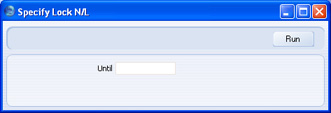
- Until
- Paste Special
Choose date
- Specify here the last date of the period that you want to be locked. This date will be copied to the Lock Transactions, Lock Others, Lock Sales Invoices and Lock Purchase Invoices fields in the Locking setting. This will mean you will no longer be able to enter a transaction of any kind with a Transaction Date that is on or before this date.
- If you specify a date that is earlier than the Lock Transactions date already in the Locking setting, the function will have no effect.
Rate Gain/Loss
Please click here for full details of this function.Budget
Use this function to delete information from records in the Budget register. Note that it removes the Base Value and Budget Key and set the Budget amounts in every row to zero: it does not delete the records themselves. You can apply the function to every record in the Budget register, or to every record featuring a specified Object.Rev. Budget
Use this function to delete information from records in the Revised Budget register. Note that it removes the % Budget and sets the Budget amounts in every row to zero: it does not delete the records themselves. You can apply this function to every record in the Revised Budget register, or to every record featuring a specified Object.Remove Values from Revised Budget
This page describes the 'Remove Values from Revised Budget' Maintenance function in the Nominal Ledger.
---
The 'Remove Values from Revised Budget' function will remove the Add % to Budget figure from every record in the Revised Budget register or from every Revised Budget record with a specified Tag/Object. It will also set the Budget sum and the Budget amounts in every row in each selected Revised Budget record to zero.
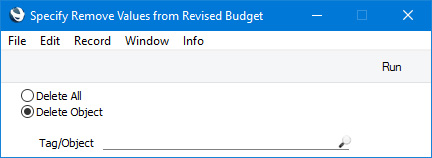
- Delete All
- Select this option if you would like to update every record in the Revised Budget register.
- Delete Object
- Select this option if you only need to update Revised Budget records with a particular Tag/Object. Specify the Tag/Object in the field below. For a Revised Budget to be updated, its Tags/Objects and those in this field must match exactly. So, a Revised Budget with the Tags/Objects "AB,10101" will not be updated if you enter "AB" in this field.
Maintenance functions in the Nominal Ledger:
- Introduction
- Account Auto Elimination
- Account Balance Transfer
- Add Tag/Object to Transactions
- Create N/L Transactions
- Generate N/L Accrual Transactions
- Lock N/L
- Rate Gain/Loss
- Remove Values from Budgets
- Remove Values from Revised Budget
- Revaluation of Base Currency 2
- Revised Budget from Budget
- Update Transactions
- Year End Simulation
- Home page for Nominal Ledger manual
- Home page for Standard ERP manual
Revaluation of Base Currency 2
Please click here for full details of this function.Revised Budget from Budget
This page describes the 'Revised Budget from Budget' Maintenance function in the Nominal Ledger.
---
The 'Revised Budget from Budget' function will create Revised Budget records from Budget records. The sub-periods listed in the matrix in a Budget will be copied to the resulting Revised Budget together with the budget values. The Add % to Budget figure in each new Revised Budget will be zero, so the overall value of a Revised Budget will be the same as the originating Budget.
If you will create a Revised Budget for one Account and then produce a Balance Sheet or Profit & Loss report using the Revised Budget comparison, the report will not contain comparisons for the other Accounts. If you need there to be comparisons for every Account, this Maintenance function provides an easy way of creating Revised Budgets for those Accounts.
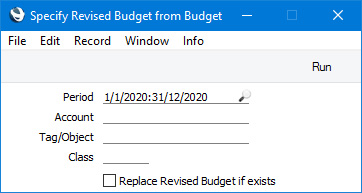
- Period
- Paste Special
Reporting Periods setting, System module
- The function will look for Budget records with periods that begin in the period that you specify here. It will then create Revised Budget records from those Budgets.
- Account
- Paste Special
Account register, Nominal Ledger/System module
- If you need to create a Revised Budget from the Budget for a particular Account, specify that Account here.
- Tag/Object
- Paste Special
Tag/Object register, Nominal Ledger/System module
- If you need to create Revised Budgets for a particular Tag/Object, specify that Tag/Object here. If you enter a number of Tags/Objects separated by commas, Revised Budgets will be created from Budgets featuring all the Tags/Objects that you have entered.
- Replace Revised Budget if exists
- The function will not create a new Revised Budget if one already exists and has been marked as OK. If one already exists but has not been marked as OK, the function will delete it and replace it with a new one if you select this option. Otherwise, it will leave the existing Revised Budget untouched and will not create a new one. An existing Revised Budget record will have the same Account, Tags/Objects, Class and Start Date as the originating Budget record.
Maintenance functions in the Nominal Ledger:
- Introduction
- Account Auto Elimination
- Account Balance Transfer
- Add Tag/Object to Transactions
- Create N/L Transactions
- Generate N/L Accrual Transactions
- Lock N/L
- Rate Gain/Loss
- Remove Values from Budgets
- Remove Values from Revised Budget
- Revaluation of Base Currency 2
- Revised Budget from Budget
- Update Transactions
- Year End Simulation
- Home page for Nominal Ledger manual
- Home page for Standard ERP manual
Update Transactions
Please click here for full details of this function.Year End Simulation
This function can be used in some countries to set all Account balances to zero at the end of a fiscal year. It will create two Simulations: one for the Income and Expense Accounts; and one for the other Accounts.
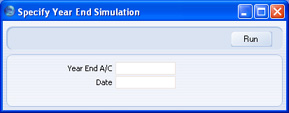
- Year End A/C
- Paste Special
Account register, Nominal Ledger/System module
- Specify the Account that will be used to balance the two Simulations. You must specify an Account, otherwise the function will have no effect.
- Date
- Paste Special
Choose date
- Enter a date to be used as the Simulation Date in the two Simulations created by the function. If you do not enter a date, the current date will be used.
- Introduction