Introduction to Maintenance in the Nominal Ledger
Maintenance functions allow you to carry out certain updating tasks, usually involving batch processing and encompassing all or many of the records in the affected register. There are fifteen such functions available in the Nominal Ledger. To use them, ensure you are in the Nominal Ledger module and click (Windows/macOS) or tap (iOS/Android) the [Routines] button in the Navigation Centre. Then click or tap the [Maintenance] button in the subsequent window. The following window appears: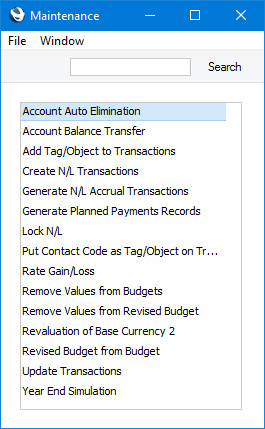
---
Please follow the links below for details about the Maintenance functions in the Nominal Ledger:
- Account Auto Elimination
- Account Balance Transfer
- Add Tag/Object to Transactions
- Create N/L Transactions
- Generate N/L Accrual Transactions
- Lock N/L
- Rate Gain/Loss
- Remove Values from Budgets
- Remove Values from Revised Budget
- Revaluation of Base Currency 2
- Revised Budget from Budget
- Update Transactions
- Year End Simulation
Go back to:
- Home page for Nominal Ledger manual
- Home page for Standard ERP manual
Account Auto Elimination
Please refer here for details about the 'Account Auto Elimination' function.---
Maintenance functions in the Nominal Ledger:
- Introduction
- Account Auto Elimination
- Account Balance Transfer
- Add Tag/Object to Transactions
- Generate N/L Accrual Transactions
- Lock N/L
- Rate Gain/Loss
- Remove Values from Budgets
- Remove Values from Revised Budget
- Revaluation of Base Currency 2
- Revised Budget from Budget
- Update Transactions
- Year End Simulation
- Home page for Nominal Ledger manual
- Home page for Standard ERP manual
Account Balance Transfer
Please refer here for a description of the 'Account Balance Transfer' function.---
Maintenance functions in the Nominal Ledger:
- Introduction
- Account Auto Elimination
- Account Balance Transfer
- Add Tag/Object to Transactions
- Generate N/L Accrual Transactions
- Lock N/L
- Rate Gain/Loss
- Remove Values from Budgets
- Remove Values from Revised Budget
- Revaluation of Base Currency 2
- Revised Budget from Budget
- Update Transactions
- Year End Simulation
- Home page for Nominal Ledger manual
- Home page for Standard ERP manual
Add Tag/Object to Transactions
This page describes the 'Add Tag/Object to Transactions' Maintenance function in the Nominal Ledger.---
The 'Add Tag/Object to Transactions' function allows you to add a particular Tag/Object to every row in every Transaction from a specified period.
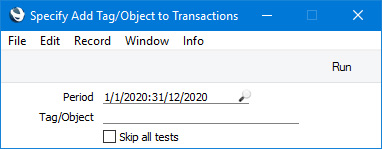
- Period
- Paste Special
Reporting Periods setting, System module
- The Tag/Object that you specify below will be added to every row in every Transaction whose Date falls in the period specified here. If you specify a period that begins before the Lock Transactions date in the Locking setting in the System module, Transactions from that date or earlier will not be updated.
- Tag/Object
- Paste Special
Tag/Object register, Nominal Ledger/System module
- Specify the Tag/Object that you want to be added to every Transaction row. If you do not specify a Tag/Object, the function will have no effect.
- Skip all tests
- By default, the function will not add the specified Tag/Object to a Transaction row that already has a Tag/Object belonging to the same Tag/Object Type, and it will not add closed or non-existent Tags/Objects to any Transaction row. These checks can be time-consuming in larger databases. If you do not want them to be carried out, select this option. One check will remain: the function will not add the Tag/Object to a Transaction row that already has the Tag/Object.
Maintenance functions in the Nominal Ledger:
- Introduction
- Account Auto Elimination
- Account Balance Transfer
- Add Tag/Object to Transactions
- Generate N/L Accrual Transactions
- Lock N/L
- Rate Gain/Loss
- Remove Values from Budgets
- Remove Values from Revised Budget
- Revaluation of Base Currency 2
- Revised Budget from Budget
- Update Transactions
- Year End Simulation
- Home page for Nominal Ledger manual
- Home page for Standard ERP manual
Create N/L Transactions
The 'Create N/L Transactions' Maintenance function is located in the System module and the Nominal Ledger. Please refer here for a description.---
Maintenance functions in the Nominal Ledger:
- Introduction
- Account Auto Elimination
- Account Balance Transfer
- Add Tag/Object to Transactions
- Create N/L Transactions
- Generate N/L Accrual Transactions
- Lock N/L
- Rate Gain/Loss
- Remove Values from Budgets
- Remove Values from Revised Budget
- Revaluation of Base Currency 2
- Revised Budget from Budget
- Update Transactions
- Year End Simulation
- Home page for Nominal Ledger manual
- Home page for Standard ERP manual
Generate N/L Accrual Transactions
Please refer here for a description of the 'Generate N/L Accrual Transactions' function.---
Maintenance functions in the Nominal Ledger:
- Introduction
- Account Auto Elimination
- Account Balance Transfer
- Add Tag/Object to Transactions
- Create N/L Transactions
- Generate N/L Accrual Transactions
- Lock N/L
- Rate Gain/Loss
- Remove Values from Budgets
- Remove Values from Revised Budget
- Revaluation of Base Currency 2
- Revised Budget from Budget
- Update Transactions
- Year End Simulation
- Home page for Nominal Ledger manual
- Home page for Standard ERP manual
Lock N/L
This page describes the 'Lock N/L' Maintenance function in the Nominal Ledger.---
The 'Lock NL' function allows you to close an accounting period to prevent the further entry of new or corrected Transactions. It does this by updating the Locking setting in the System module. As well as updating the Locking setting, the function will assign a unique Sequence Number to every Transaction in the newly locked period. Sequence Numbers will be assigned to Transactions in Transaction Date order, so that for example the Transaction created from a Sales Invoice on a particular date might be followed in the sequence by the Transaction created from a Purchase Invoice on the same date. The sequence will begin at 1 and will be reset back to 1 at the beginning of each Fiscal Year. Assigning Sequence Numbers to Transactions is a legal requirement in some countries.
You can have Sequence Numbers printed instead of Transaction Numbers in the Nominal Ledger report and the Transaction Journal. To do so, print them using the
Don't Print Transaction Prefix option. If you need Sequence Numbers to be printed in Transaction forms, add the "Sequence" field to the Form Template.
Note that this function will only add Sequence Numbers to Transactions in the Fiscal Year containing the date that you specify. After locking a particular period you will not be able to lock an earlier one. The date that you specify does not need to be the last date of a month or a year. For example, you might choose to run the function monthly. If your Fiscal Year runs from January to December, running the function with January 31 as the specified date will set January 31 as the lock date in the Locking setting and will add Sequence Numbers to all Transactions from January. It will not add Sequence Numbers to any Transactions from the previous December that do not have them because December is in the previous Fiscal Year. Running the function again with February 28 as the specified date will set February 28 as the lock date and will add Sequence Numbers to all Transactions from February. Running the function for a third time with April 30 as the specified date will set April 30 as the lock date and will add Sequence Numbers to all Transactions from March and April. If you do need to add Sequence Numbers to Transactions in a previous Fiscal Year, you will need to change to an earlier lock date in the Locking setting first (e.g. if you need to add Sequence Numbers to Transactions in the previous December, set the lock date back to November 30). You will only be able to do this if you have logged in as a Global User or Person belonging to an Access Group in which Full access has been granted to the 'Change System Locking' Action.
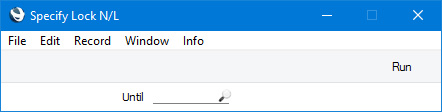
- Until
- Paste Special
Choose date
- Specify here the last date of the period that you want to be locked. The date that you specify here will be copied to the Lock Transactions, Lock Others, Lock Sales Invoices and Lock Purchase Invoices fields in the Locking setting. This will mean you will no longer be able to enter a transaction of any kind with a Transaction Date that is on or before this date.
- If you specify a date that is earlier than the Lock Transactions date already in the Locking setting, the function will have no effect.
Maintenance functions in the Nominal Ledger:
- Introduction
- Account Auto Elimination
- Account Balance Transfer
- Add Tag/Object to Transactions
- Create N/L Transactions
- Generate N/L Accrual Transactions
- Lock N/L
- Rate Gain/Loss
- Remove Values from Budgets
- Remove Values from Revised Budget
- Revaluation of Base Currency 2
- Revised Budget from Budget
- Update Transactions
- Year End Simulation
- Home page for Nominal Ledger manual
- Home page for Standard ERP manual
Rate Gain/Loss
Please refer here for full details about this function.---
Maintenance functions in the Nominal Ledger:
- Introduction
- Account Auto Elimination
- Account Balance Transfer
- Add Tag/Object to Transactions
- Create N/L Transactions
- Generate N/L Accrual Transactions
- Lock N/L
- Rate Gain/Loss
- Remove Values from Budgets
- Remove Values from Revised Budget
- Revaluation of Base Currency 2
- Revised Budget from Budget
- Update Transactions
- Year End Simulation
- Home page for Nominal Ledger manual
- Home page for Standard ERP manual
Remove Values from Budgets
This page describes the 'Remove Values from Budgets' Maintenance function in the Nominal Ledger.---
The 'Remove Values from Budgets' function will remove the Base Value and Budget Key from every record in the Budget register or from every Budget record with a specified Tag/Object. It will also set the Budget sum and the Budget amounts in every row in each selected Budget record to zero.
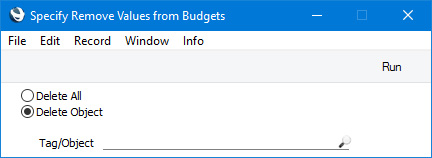
- Delete All
- Select this option if you would like to update every record in the Budget register.
- Delete Object
- Select this option if you only need to update Budget records with a particular Tag/Object. Specify the Tag/Object in the field below. For a Budget to be updated, its Tags/Objects and those in this field must match exactly. So, a Budget with the Tags/Objects "AB,10101" will not be updated if you enter "AB" in this field.
Maintenance functions in the Nominal Ledger:
- Introduction
- Account Auto Elimination
- Account Balance Transfer
- Add Tag/Object to Transactions
- Create N/L Transactions
- Generate N/L Accrual Transactions
- Lock N/L
- Rate Gain/Loss
- Remove Values from Budgets
- Remove Values from Revised Budget
- Revaluation of Base Currency 2
- Revised Budget from Budget
- Update Transactions
- Year End Simulation
- Home page for Nominal Ledger manual
- Home page for Standard ERP manual
Remove Values from Revised Budget
This page describes the 'Remove Values from Revised Budget' Maintenance function in the Nominal Ledger.---
The 'Remove Values from Revised Budget' function will remove the Add % to Budget figure from every record in the Revised Budget register or from every Revised Budget record with a specified Tag/Object. It will also set the Budget sum and the Budget amounts in every row in each selected Revised Budget record to zero.
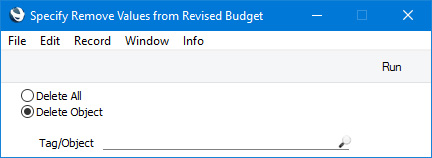
- Delete All
- Select this option if you would like to update every record in the Revised Budget register.
- Delete Object
- Select this option if you only need to update Revised Budget records with a particular Tag/Object. Specify the Tag/Object in the field below. For a Revised Budget to be updated, its Tags/Objects and those in this field must match exactly. So, a Revised Budget with the Tags/Objects "AB,10101" will not be updated if you enter "AB" in this field.
Maintenance functions in the Nominal Ledger:
- Introduction
- Account Auto Elimination
- Account Balance Transfer
- Add Tag/Object to Transactions
- Create N/L Transactions
- Generate N/L Accrual Transactions
- Lock N/L
- Rate Gain/Loss
- Remove Values from Budgets
- Remove Values from Revised Budget
- Revaluation of Base Currency 2
- Revised Budget from Budget
- Update Transactions
- Year End Simulation
- Home page for Nominal Ledger manual
- Home page for Standard ERP manual
Remove Values from Revised Budget
This page describes the 'Remove Values from Revised Budget' Maintenance function in the Nominal Ledger.---
The 'Remove Values from Revised Budget' function will remove the Add % to Budget figure from every record in the Revised Budget register or from every Revised Budget record with a specified Tag/Object. It will also set the Budget sum and the Budget amounts in every row in each selected Revised Budget record to zero.
- Delete All
- Select this option if you would like to update every record in the Revised Budget register.
- Delete Object
- Select this option if you only need to update Revised Budget records with a particular Tag/Object. Specify the Tag/Object in the field below. For a Revised Budget to be updated, its Tags/Objects and those in this field must match exactly. So, a Revised Budget with the Tags/Objects "AB,10101" will not be updated if you enter "AB" in this field.
Maintenance functions in the Nominal Ledger:
- Introduction
- Account Auto Elimination
- Account Balance Transfer
- Add Tag/Object to Transactions
- Create N/L Transactions
- Generate N/L Accrual Transactions
- Lock N/L
- Rate Gain/Loss
- Remove Values from Budgets
- Remove Values from Revised Budget
- Revaluation of Base Currency 2
- Revised Budget from Budget
- Update Transactions
- Year End Simulation
- Home page for Nominal Ledger manual
- Home page for Standard ERP manual
Revaluation of Base Currency 2
Please refer here for full details about this function.---
Maintenance functions in the Nominal Ledger:
- Introduction
- Account Auto Elimination
- Account Balance Transfer
- Add Tag/Object to Transactions
- Create N/L Transactions
- Generate N/L Accrual Transactions
- Lock N/L
- Rate Gain/Loss
- Remove Values from Budgets
- Remove Values from Revised Budget
- Revaluation of Base Currency 2
- Revised Budget from Budget
- Update Transactions
- Year End Simulation
- Home page for Nominal Ledger manual
- Home page for Standard ERP manual
Revised Budget from Budget
This page describes the 'Revised Budget from Budget' Maintenance function in the Nominal Ledger.---
The 'Revised Budget from Budget' function will create Revised Budget records from Budget records. The sub-periods listed in the matrix in a Budget will be copied to the resulting Revised Budget together with the budget values. The Add % to Budget figure in each new Revised Budget will be zero, so the overall value of a Revised Budget will be the same as the originating Budget.
If you will create a Revised Budget for one Account and then produce a Balance Sheet or Profit & Loss report using the Revised Budget comparison, the report will not contain comparisons for the other Accounts. If you need there to be comparisons for every Account, this Maintenance function provides an easy way of creating Revised Budgets for those Accounts.
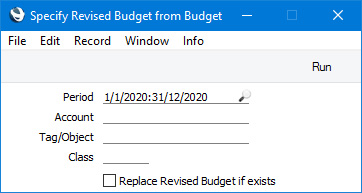
- Period
- Paste Special
Reporting Periods setting, System module
- The function will look for Budget records with periods that begin in the period that you specify here. It will then create Revised Budget records from those Budgets.
- Account
- Paste Special
Account register, Nominal Ledger/System module
- If you need to create a Revised Budget from the Budget for a particular Account, specify that Account here.
- Tag/Object
- Paste Special
Tag/Object register, Nominal Ledger/System module
- If you need to create Revised Budgets for a particular Tag/Object, specify that Tag/Object here. If you enter a number of Tags/Objects separated by commas, Revised Budgets will be created from Budgets featuring all the Tags/Objects that you have entered.
- Replace Revised Budget if exists
- The function will not create a new Revised Budget if one already exists and has been marked as OK. If one already exists but has not been marked as OK, the function will delete it and replace it with a new one if you select this option. Otherwise, it will leave the existing Revised Budget untouched and will not create a new one. An existing Revised Budget record will have the same Account, Tags/Objects, Class and Start Date as the originating Budget record.
Maintenance functions in the Nominal Ledger:
- Introduction
- Account Auto Elimination
- Account Balance Transfer
- Add Tag/Object to Transactions
- Create N/L Transactions
- Generate N/L Accrual Transactions
- Lock N/L
- Rate Gain/Loss
- Remove Values from Budgets
- Remove Values from Revised Budget
- Revaluation of Base Currency 2
- Revised Budget from Budget
- Update Transactions
- Year End Simulation
- Home page for Nominal Ledger manual
- Home page for Standard ERP manual
Update Transactions
Please refer here for full details about this function.---
Maintenance functions in the Nominal Ledger:
- Introduction
- Account Auto Elimination
- Account Balance Transfer
- Add Tag/Object to Transactions
- Create N/L Transactions
- Generate N/L Accrual Transactions
- Lock N/L
- Rate Gain/Loss
- Remove Values from Budgets
- Remove Values from Revised Budget
- Revaluation of Base Currency 2
- Revised Budget from Budget
- Update Transactions
- Year End Simulation
- Home page for Nominal Ledger manual
- Home page for Standard ERP manual
Year End Simulation
This page describes the 'Year End Simulation' Maintenance function in the Nominal Ledger.---
The 'Year End Simulation' function is designed to be used in some countries (for example, Argentina) to set all Account balances to zero at the end of a fiscal year and to post end-of-year results. Running the function will create three Simulations as follows:
- Closing Year: Swap Results to Equity. This Simulation, dated at the end of a financial year, will set the balances of the Income and Expense Accounts to zero, with a balancing posting to a specified Year End Account. The Status of each row in this Simulation (visible on flip B) will be "Year End Stage 1".
- Closing Year: Swap Equity Accounts. This Simulation, dated at the end of a financial year, will set the balances of the Asset, Liability and Equity Accounts to zero, again with a balancing posting to a specified Year End Account. The Status of each row in this Simulation will be "Year End Stage 1".
- Opening Year: Swap Equity Accounts. This Simulation, dated at the beginning of a new financial year, will reverse the previous one, re-instating the balances of the Asset, Liability and Equity Accounts. The Status of each row in this Simulation will be "Year End Stage 2".
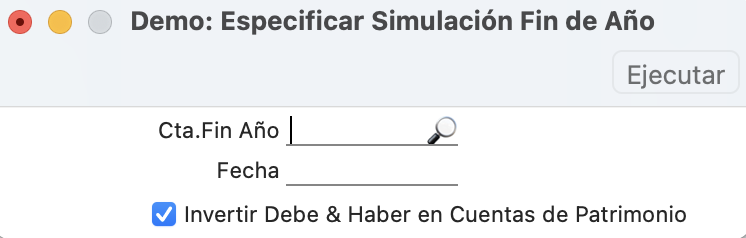
- Year End A/C
- Paste Special
Account register, Nominal Ledger/System module
- Specify the Account that will be used to balance the three Simulations. You must specify an Account, otherwise the function will have no effect.
- Date
- Paste Special
Choose date
- Enter a date to be used as the Simulation Date in the two end-of-year Simulations that will be created by the function. If you do not enter a date, the current date will be used. The third Simulation (Opening Year: Swap Equity Accounts) will be dated one day later. As this Simulation should be dated at the beginning of a new financial year, the date that you specify here should be the last day of the previous year.
- Swap Debit & Credit of Equity Accounts
- This option is only available in Argentina (i.e. when the VAT Law in the Company Info setting is "Argentinean"). If this option is selected (and in countries other than Argentina), the function will create three Simulations as described above the illustration. Deselecting the option will mean that the third Simulation (Opening Year: Swap Equity Accounts) will not be created.
Maintenance functions in the Nominal Ledger:
- Introduction
- Account Auto Elimination
- Account Balance Transfer
- Add Tag/Object to Transactions
- Create N/L Transactions
- Generate N/L Accrual Transactions
- Lock N/L
- Rate Gain/Loss
- Remove Values from Budgets
- Remove Values from Revised Budget
- Revaluation of Base Currency 2
- Revised Budget from Budget
- Update Transactions
- Year End Simulation
- Home page for Nominal Ledger manual
- Home page for Standard ERP manual