|
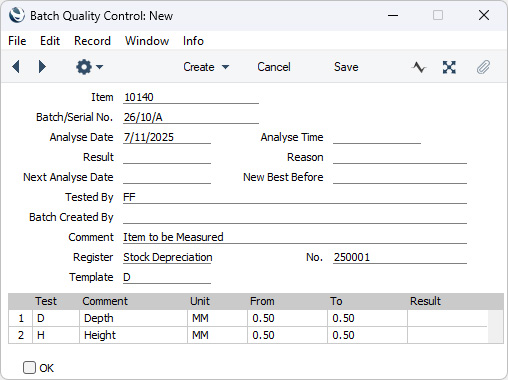
Search HansaManuals.com HansaManuals Home >> Standard ERP >> Stock >> Stock Depreciation Register Nazaj Naprej Celo poglavje v tiskani obliki Išči Besedilo se nanaša na programsko verzijo 2026-06-25 Row Menu - Stock Depreciation - Quality Control This page describes the 'Quality Control' function on the Row menu in the Stock Depreciation record window. If you are using iOS or Android, the 'Quality Control' function is on the Tools menu (with 'wrench' icon).--- The 'Quality Control' function will be useful in cases where an Item is one that should be subject to a quality control cycle. For example, the Item might be perishable. In the context of a Stock Depreciation record, a probable reason for creating a Quality Control record will be to record the failing of a quality control test, to support the creation of the Stock Depreciation record. To use this function, first place the insertion point in a row containing the relevant Item (which must be Serial Numbered at Unit or Batch level). Then open the Row menu by right-clicking (Windows) or Ctrl-clicking (macOS) the row number. When the Row menu opens, select 'Quality Control'. If you are using iOS or Android, select 'Quality Control' from the Tools menu (with 'wrench' icon). A new record will be created in the Batch Quality Control setting in the Service Orders module:
If the function does not create a Batch Quality Control record when expected, the probable causes are:
--- The Stock Depreciation register in Standard ERP:
Go back to:
|