Update Item Cost Price
This page describes the 'Update Item Cost Price' Maintenance function in the Stock module.
---
The 'Update Item Cost Price' function allows you to update Cost Prices of Stocked Items in the Item register. The new Cost Prices will be taken from the Goods Receipt register.
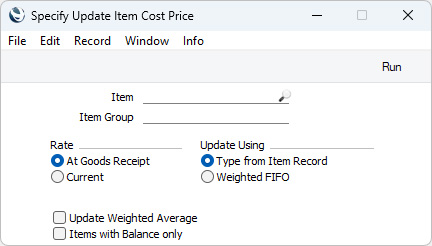
- Item
- Paste Special
Item register
- Range Reporting Alpha
- Enter an Item Number or range of Item Numbers here to update the Cost Price of a specific Item or of a range of Items. You can also leave the field blank if you need to update all Stocked Items.
- Item Group
- Paste Special
Item Group register, Sales Ledger
- Enter an Item Group here if you need to update the Cost Prices of the Stocked Items belonging to a particular Item Group.
- Rate
- Choose one of these options to specify how Cost Prices will be calculated for Items that were purchased in Currencies other than Base Currency 1.
- At Goods Receipt
- Cost Prices will be calculated using the exchange rate applying on the date of each Goods Receipt. This is recommended, because it will give the same value as in the stock report.
- Current
- Cost Prices will be calculated using the current exchange rate.
- Update Using
- Choose an option to determine how the new Cost Prices are to be calculated.
- Type from Item Record
- New Cost Prices will be calculated using the Update Cost Price at Goods Receipt option specified on the 'Costs' card of each Item record. If the "Weighted Average" option is specified in an Item record, a new weighted average figure will be calculated from past stock transactions, and a Cost Price in Base Currency 2 will also be calculated if you have specified a Base Currency 2 in the Base Currency setting in the System module.
- Weighted FIFO
- New Cost Prices will be calculated using the usual Cost Model for each Item. This will be the Cost Model specified in the relevant Item or Item Group record or, if that Cost Model is Default, the Primary Cost Model specified in the Cost Accounting setting. Cost Prices in Base Currency 2 will also be calculated if you have specified a Base Currency 2 in the Base Currency setting in the System module.
- Update Weighted Average
- Select this option if you need the Weighted Average field in each Item to be recalculated and updated (as well as the Cost Price).
- Only Items with Balance
- Select this option if you only need to update Items that you have in stock.
If you want to change Cost Prices using a formula (e.g. you might want to increase all Cost Prices by 10%), use the
'Update Item Cost Prices' Maintenance function in the Pricing module.
---
Go back to:



