|
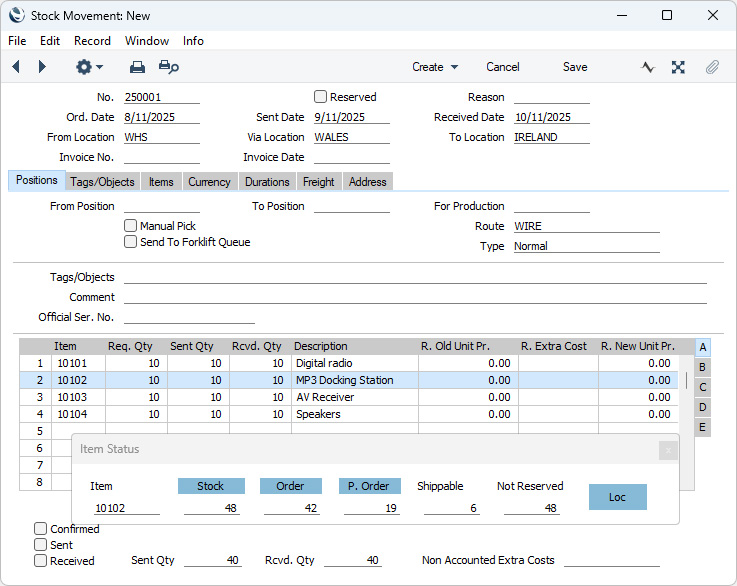
Search HansaManuals.com HansaManuals Home >> Standard ERP >> Magazyn >> Kartoteka Przesunięcia MM Poprzednia Następna Wersja do wydruku Szukaj Opis dotyczy systemu HansaWorld Enterprise wersja 2026-06-25 Row Menu - Stock Movement - Item Status This page describes the 'Item Status' function on the Row menu in the Stock Movement record window. This function can't be used on iOS or Android.--- The 'Item Status' function displays the current status (for example, the quantity in stock, the quantity on unfulfilled Sales Orders, etc) of any of the Items in a Stock Movement in a separate 'Item Status' window. To open the 'Item Status' window, first click in any field in the Stock Movement row containing the Item you are interested in. Then open the Row menu by right-clicking (Windows) or ctrl-clicking (macOS) the row number and select the 'Item Status' function. The 'Item Status' window will be opened. For the example illustrated below, we clicked in the second row of a Stock Movement (containing Item 10102) before selecting the 'Item Status' function:
If you have only specified a From Location in a Stock Movement, the figures in the 'Item Status' window will refer to that Location. If you have specified both a From Location and a Via Location, the figures in the 'Item Status' window will refer to the From Location until you mark the Stock Movement as Sent and save. From that moment, the figures in the 'Item Status' window will refer to the Via Location. If you would like the 'Item Status' window to open automatically whenever you open a Stock Movement (if it isn't open already), select the Show Item Status option in the Item Settings setting in the Sales Ledger. Please refer here for full details about the 'Item Status' window, including details about how the figures are calculated, about using the Item Status Settings setting in the Sales Ledger to choose which figures will be shown in the 'Item Status' window and about displaying different figures in the 'Item Status' window to different users. --- The Stock Movement register in Standard ERP:
|