Address Labels
This page describes the Address Labels form in the Stock module.
---
The Address Labels form in the Stock module allows you to print name and address labels for Customers. A single label will be printed on each page.
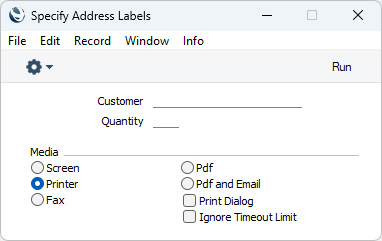
- Customer
- Paste Special
Customers in Contact register
- Range Reporting Alpha
- Enter the Contact Number of the Customer for whom you need labels to be printed. You can also enter a range of Contact s separated by a colon (:): labels will only be printed for the Contacts in the range that are Customers.
- Quantity
- Specify here the number of labels that you need to be printed for each Customer. You must enter a quantity otherwise no labels will be printed.
Usually when designing Form Templates that will be used to print labels, you should use fields with Field Arguments and no Fieldnames to have static text printed on the labels (i.e. text that identifies the information on the labels, such as "Contact Name"). As each Address Label will be printed on a separate page, you don't need to use this method in the Form Template that will be used by the Address Labels form. Instead you can use text objects as you would in Form Templates that will not be used to print labels.
You can use the following fields when you design the Form Template to be used by the Address Label form:
| Field in Form Template | Prints (from Contact record) |
| |
| Address 1 | Invoice Address, first line |
| Address 2 | Invoice Address, second line |
| Address 3 | Invoice Address, third line |
| Address 5 | Invoice Address, fourth line |
| Address 6 | Invoice Address, fifth line |
| Contact Person | Primary Contact |
| Customer Number | No. (i.e. Contact Number of the Customer) |
| Department | Department |
| Document Type | Prints the word "Label". This field only prints if the VAT Law in the Company Info setting is set to "Portuguese" |
| Name | Name (i.e. Customer Name) |
| Quantity | Quantity from the Form's specification window |
| Supplier Address 1 | Delivery Address, first line |
| Supplier Address 2 | Delivery Address, second line |
| Supplier Address 3 | Delivery Address, third line |
| Supplier Address 4 | Delivery Address, fourth line |
| Supplier Address 5 | Delivery Address, fifth line |
---
Go back to:


 Introduction to Forms in the Stock Module
