|
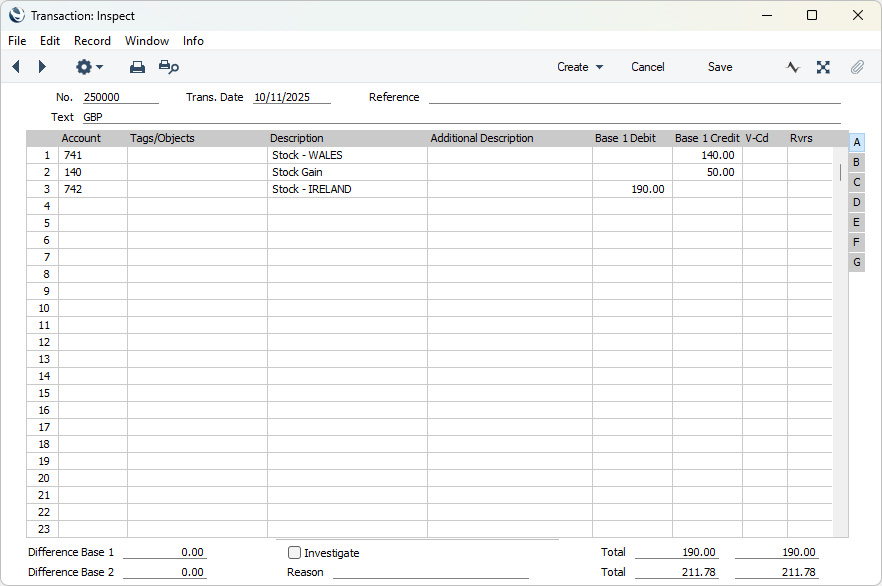
Search HansaManuals.com HansaManuals Home >> Standard ERP >> Varulager >> Register Lagertransaktioner Föregående Nästa Skriv ut hela kapitlet Sök Detta avser program version 2026-06-25 Nominal Ledger Transactions from Stock Movements A Nominal Ledger Transaction will be generated automatically (if you have so determined in the Sub Systems setting in the Nominal Ledger and in the Number Series - Stock Movements setting) when you mark a Stock Movement as Sent and save, and again when you mark it as Received and save.In normal circumstances, the first Transaction (the "Sent Transaction") will credit the Stock Account of the From Location with a figure based on the S. Old Unit Price and debit the Stock Account of the Via Location with a figure based on the S. New Unit Price. This Transaction therefore records in the Nominal Ledger the moving of the stock from the From Location to the Via Location. If there is no Via Location, you will not mark the Stock Movement as Sent, and so there will be no Sent Transaction. The second Transaction (the "Received Transaction") will depend on whether there is a Via Location. If there is a Via Location, the Transaction will credit the Stock Account of the Via Location with a figure based on the R. Old Unit Price and debit the Stock Account of the To Location with a figure based on the R. New Unit Price. This Transaction therefore records in the Nominal Ledger the moving of the stock from the Via Location to the To Location. If there is no Via Location (i.e. if the Stock Movement was never marked as Sent), the Transaction will credit the Stock Account of the From Location with a figure based on the R. Old Unit Price and debit the Stock Account of the To Location with a figure based on the R. New Unit Price. This records in the Nominal Ledger the moving of the stock from the From Location to the To Location. If there is no Via Location, you will still need to mark the Stock Movement as Received, and so there will always be a Received Transaction, even if there is no Sent Transaction. If you have not specified a Stock Account for one of the Locations, the Stock Account from the Item Group will be used for that Location (if you are using the Use Item Groups for Cost Accounts option in the Cost Accounting setting). Otherwise the Stock Account will be taken from the Account Usage Stock setting. Any difference between the Old and New Unit Prices (i.e. any S. Extra Cost or R. Extra Cost) will be credited to the Stock Gain Account, as also specified in the Account Usage Stock setting (if it is an increase in value) or debited to the Stock Loss Account specified in the same setting (if it is a decrease). Tags/Objects for each Location will be assigned to the relevant postings to the Stock Account. If you need the Tags/Objects specified in the header of Stock Movements and in each row to be assigned to these postings, select the Tag/Object on Stock Account option in the Cost Accounting setting, The Tags/Objects specified in the header and in each row will also be assigned to any postings to the Stock Gain or Stock Loss Account.
--- The Stock Movement register in Standard ERP:
|