Introduction to Exports in the Purchase Orders Module
The 'Exports' function provides for the exporting of certain information to tab-delimited text files from where it can be incorporated in word processing programs for mailmerge, in spreadsheets for further statistical analysis or in page make-up programs for incorporation in publicity material or published reports. Alternatively, it can be imported into other Hansa databases or Companies using the 'Automatic' and 'Automatic manual file search' import functions in the System module. The function is selected using the 'Exports' item on the File menu or by clicking the [Exports] button in the Master Control panel.On selecting the function, the window illustrated below appears. This lists the single Export which can be produced from the Purchase Orders module. Double-click the item in the list: a specification window will then appear, where you can decide the contents of the exported text file. Click [Run] and a 'Save File' dialogue box will appear, where you can name the file and determine where it is to be saved.
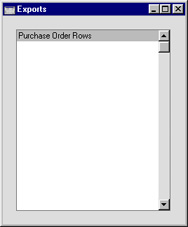
Purchase Order Rows
This command exports data from one or more Purchase Orders. The result of the export is a text file with one row for each Purchase Order row. This can be used for further statistical analysis.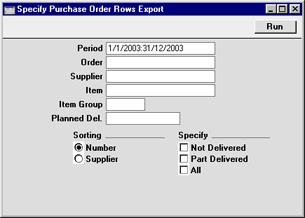
- Period
- Paste Special
Reporting Periods setting, System module
- Enter the start and end date of the reporting period.
- Order
- Range Reporting
Numeric
- Use this field to limit the export to rows of a single Purchase Order, or range of Purchase Orders.
- Supplier
- Paste Special
Supplier register
- Range Reporting Alpha
- Use this field to limit the export to rows of Purchase Orders made out to a single Supplier or range of Suppliers.
- Use this field to limit the export to rows of Purchase Orders made out to a single Supplier or range of Suppliers.
- Item
- Paste Special
Item register
- Range Reporting Alpha
- Use this field to limit the export to Purchase Order rows featuring a particular Item.
- Use this field to limit the export to Purchase Order rows featuring a particular Item.
- Item Group
- Paste Special
Item Group register, Sales Ledger
- Use this field to limit the export to Purchase Order rows featuring Items of a particular Item Group.
- Planned Del.
- Paste Special
Current Date
- If you wish to export rows of Purchase Orders whose Deliveries are to be received on a specific date (based on the Planned Del. field on the 'Date' card of the Purchase Order screen), enter that date here.
- Sorting
- Select Number or Supplier as sort order.
- Specify
- Select one or more of the options.