Introduction to Reports in the Consolidation Module
As with all modules, to print a report in the Consolidation module, click (Windows/macOS) or tap (iOS/Android) the [Reports] button in the Navigation Centre. You can also use the keyboard shortcut Ctrl-R (Windows) or ⌘-R (macOS) key combinations. The 'Reports' window will open, listing the reports that are available in the Consolidation module: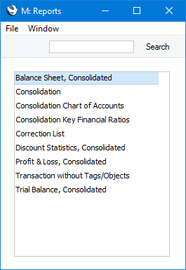
You can often report on a selection range, such as a range of Account Numbers. To do this, enter the lowest and highest values of the range, separated by a colon. For example, to report on Accounts 001 to 010, enter "001:010" in the Account Number field. Depending on the field, the sort used might be alpha or numeric. In the case of an alpha sort, a range of 1:2 would also include 100, 10109, etc.
Use the Media options at the bottom of the specification window to determine the print destination of the report. The default is to print to screen. You can initially print to screen and subsequently send the report to a printer by clicking the Printer icon at the top of the report window (Windows/macOS) or by selecting 'Recalculate and Print' from the Operations menu. If you are using iOS or Android, you will find this function on the Tools menu (with 'wrench' icon).
Once you have entered the reporting criteria and have chosen a print destination, click or tap [Run].
If you print a report to screen, you can use the 'Recalculate' command on the Operations menu of the report window to update the report after making alterations to background data. The 'Reopen Report Specification' command on the same menu allows you to update the report using different reporting criteria. If you are using iOS or Android, the 'Recalculate' function will be on the Tools menu. There will be no 'Reopen Report Specification' command: tap < to go back to the specification window instead.
---
Please follow the links below for details about each report in the Consolidation module::
- Balance Sheet, Consolidated
- Consolidation
- Consolidation Chart of Accounts
- Correction List
- Discount Statistics, Consolidated
- Key Financial Ratios, Profit & Loss
- Trial Balance, Consolidated
- Home page for Consolidation manual
- Home page for Standard ERP manual
Balance Sheet, Consolidated
This page describes the Balance Sheet, Consolidated report in the Consolidation module.---
The Balance Sheet in the Consolidation module is very similar to the standard report in the Nominal Ledger and uses the same report definition. Please refer to the following pages for full details about the standard Balance Sheet report, including descriptions of:
- The 'Specify Balance Sheet' window
- The Report Definition
- The specification window for the Balance Sheet, Consolidated report contains an additional Include Daughter Companies option. Use this option when you need to produce a consolidated Balance Sheet that includes every Company in the group.
- The figures in the Balance Sheet, Consolidated report will be in the Group Currency. When producing the report from the Nominal Ledger, you will be able to choose whether the report will be in Base Currency 1 or Base Currency 2.
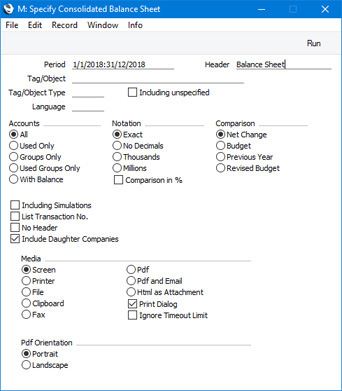
- Include Daughter Companies
- If you are producing a Balance Sheet from the Mother Company, select this option if you want to produce a consolidated report that includes Transactions from the Daughter Companies as well as those in the Mother Company. If you do not select this option, a 'standard' Balance Sheet will be produced, from the Transactions in the Mother Company only. If you are producing the report from a Company that does not have Daughters, selecting this option will not affect how the report is calculated.
Drill Down
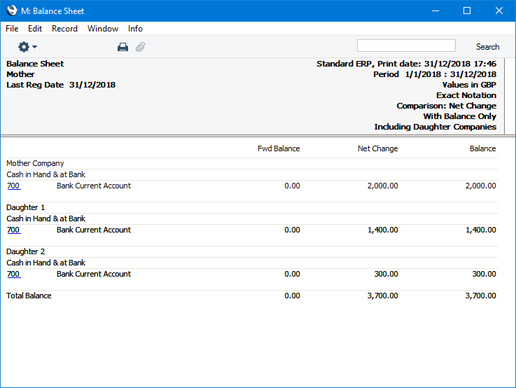
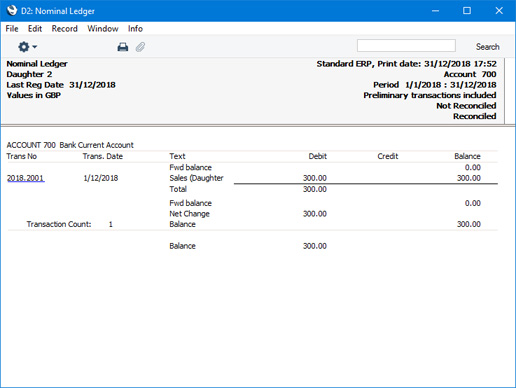
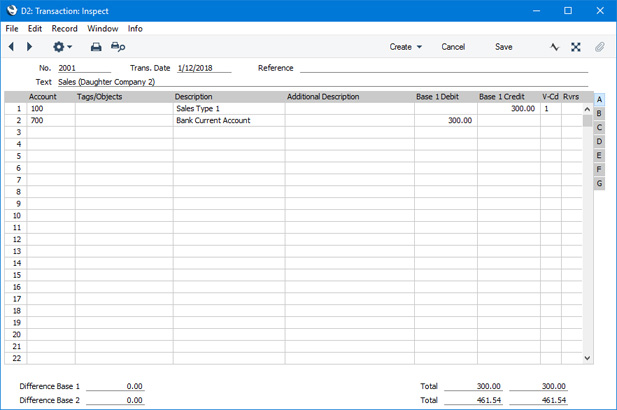
When you print a Balance Sheet to screen from the Mother Company and using the Include Daughter Companies option, it will contain the same Drill-down feature as the standard version of the report. In this case, however, you will be able to drill down to individual Daughter Company Transactions from a report produced in the Mother Company.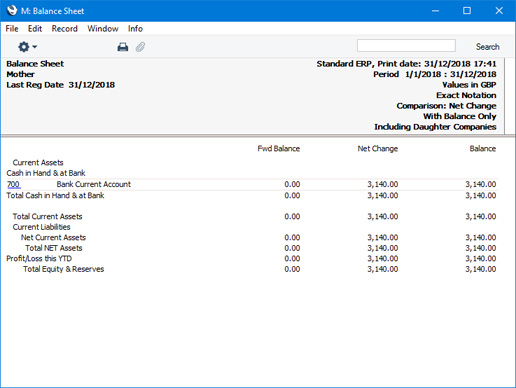
Reports in the Consolidation module:
- Introduction
- Balance Sheet, Consolidated
- Consolidation
- Consolidation Chart of Accounts
- Correction List
- Discount Statistics, Consolidated
- Key Financial Ratios, Profit & Loss
- Trial Balance, Consolidated
- Home page for Consolidation manual
- Home page for Standard ERP manual
Consolidation
This page describes the Consolidation report in the Consolidation module.---
Standard ERP's Consolidation module is designed so that information in Daughter Companies can be made available to certain reports in the Mother Company without the need physically to transfer any Daughter Company information to the Mother Company. This makes it very easy to produce consolidated reports, and removes the risk of error inherent in copying information from one Company to another.
However, the requirement to have the Mother and Daughter Companies in the same database may not be practical in every case. Where this is so, you can use the 'Consolidation' Export function to export Transaction information from a Daughter Company to a text file. This text file can then be imported to the Mother Company.
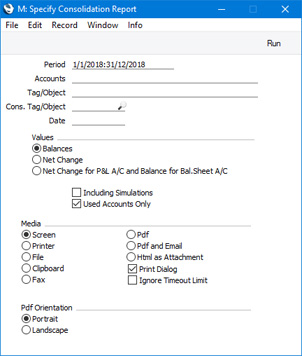
Before using the Export function, you can produce a Consolidation report from the same Company to see what will be included in the text file. The 'Specify Consolidation Report' window is similar to the 'Specify Consolidation Export' window: please refer here for full details.
Reports in the Consolidation module:
- Introduction
- Balance Sheet, Consolidated
- Consolidation
- Consolidation Chart of Accounts
- Correction List
- Discount Statistics, Consolidated
- Key Financial Ratios, Profit & Loss
- Trial Balance, Consolidated
- Home page for Consolidation manual
- Home page for Standard ERP manual
Consolidation Chart of Accounts
This page describes the Consolidation Chart of Accounts report in the Consolidation module.---
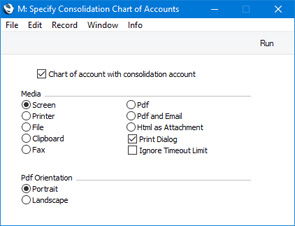
The Consolidation Chart of Accounts report is a list of Accounts in the Account register. If you produce this report in a Daughter Company, you will be able to use it to check that a Consolidation Account has been specified for each Account (i.e. that each Account has all been linked to an Account in the Mother Company). The report also shows the status of the Reduce Minorities check box for each Account.
---
Reports in the Consolidation module:
- Introduction
- Balance Sheet, Consolidated
- Consolidation
- Consolidation Chart of Accounts
- Correction List
- Discount Statistics, Consolidated
- Key Financial Ratios, Profit & Loss
- Trial Balance, Consolidated
- Home page for Consolidation manual
- Home page for Standard ERP manual
Correction List
This page describes the Correction List report in the Consolidation module.---
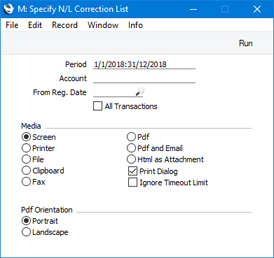
The Correction List report in the Consolidation module is similar to the Correction List in the Nominal Ledger, with the exception that it lists corrected or updated Transactions from every Company in the database. You can run the report from any Company. Please refer here for full details about this report.
Reports in the Consolidation module:
- Introduction
- Balance Sheet, Consolidated
- Consolidation
- Consolidation Chart of Accounts
- Correction List
- Discount Statistics, Consolidated
- Key Financial Ratios, Profit & Loss
- Trial Balance, Consolidated
- Home page for Consolidation manual
- Home page for Standard ERP manual
Discount Statistics, Consolidated
This page describes the Discount Statistics, Consolidated report in the Consolidation module.---
The Discount Statistics report in the Consolidation module is very similar to the standard report in the Sales Ledger and Pricing module. Please refer here for full details about the standard report.
Compared to the standard version of the Discount Statistics report, the Discount Statistics, Consolidated report includes an additional Include Daughter Companies option. Use this option when you need to produce a consolidated Discount Statistics report that includes every Daughter Company.
---
Reports in the Consolidation module:
- Introduction
- Balance Sheet, Consolidated
- Consolidation
- Consolidation Chart of Accounts
- Correction List
- Discount Statistics, Consolidated
- Key Financial Ratios, Profit & Loss
- Trial Balance, Consolidated
- Home page for Consolidation manual
- Home page for Standard ERP manual
Key Financial Ratios, Profit & Loss
This page describes the Consolidation Key Financial Ratios and Profit & Loss, Consolidated reports in the Consolidation module.---
The Key Financial Ratios and Profit & Loss reports in the Consolidation module are very similar to the standard reports in the Nominal Ledger and use the same report definitions. Please follow the links below for full details about the standard reports, including:
- The Report Definition of the Key Financial Ratios report
- The 'Specify Key Financial Ratios' window
- The Report Definition of the Profit & Loss report
- The 'Specify Profit & Loss' window
- The consolidated report specification windows contain an additional Include Daughter Companies option. Use this option when you need to produce a consolidated report that includes every Company in the group.
- The figures in the Profit & Loss, Consolidated report will be in the Group Currency when you produce it from the Consolidation module.
When producing the report from the Nominal Ledger, you will be able to choose whether the report will be in Base Currency 1 or Base Currency 2. Please refer to the section describing the Balance Sheet above for details about the multi-company drill-down feature.
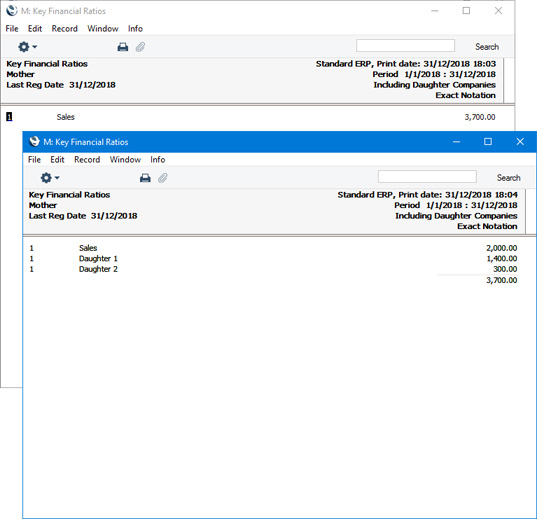
- As in the standard Key Financial Ratios report, the consolidated version of the report will contain a single line for each Key Ratio. If you produce the report using the Include Daughter Companies option, the Key Ratios will be calculated from every Company in the group. You will be able to drill down from a Key Ratio Code to produce a second report that shows the value of the Key Ratio in each Company.
Reports in the Consolidation module:
- Introduction
- Balance Sheet, Consolidated
- Consolidation
- Consolidation Chart of Accounts
- Correction List
- Discount Statistics, Consolidated
- Key Financial Ratios, Profit & Loss
- Trial Balance, Consolidated
- Home page for Consolidation manual
- Home page for Standard ERP manual
Grāmatojumi bez objektiem
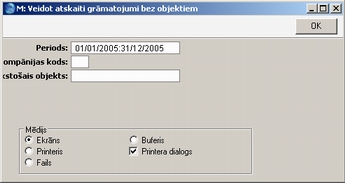
Šajā atskaitē iekļauts to grāmatojumu saraksts, kuriem nav piesaistīti objekti.Šo atskaiti var veidot jebkurā kompānijā. Ja to izveidosit mātes kompānijā, tajā būs atsevišķas sadaļas par mātes kompāniju un katras meitas kompāniju.
Attēlojot uz ekrāna, šajā atskaitē pieejama saite uz pamatierakstu. Noklikšķiniet uz nepieciešamā grāmatojuma numura, lai atvērtu attiecīgo ierakstu.
- Periods
- Ievietot Speciāli
Sistēmas moduļa sagatavošana Atskaišu periodi
- Atskaitē tiks iekļauti visi tie grāmatojumi bez objektiem, kuru grāmatošanas datums ietilps norādītajā periodā.
- Kompānijas kods
- Ja atskaiti veidojat mātes kompānijā un šo lauku neaizpildāt, atskaitē būs atsevišķas sadaļas mātes kompānijai un katrai meitas kompānijai. Ja šajā laukā norādīsit meitas kompāniju, atskaitē būs viena sadaļa par mātes kompāniju, un viena par norādītās meitas kompāniju.
- Trūkstošais objekts
- Ievietot Speciāli
Finanšu/Sistēmas moduļa reģistrs Objekti
- Ja vēlaties uzskaitīt grāmatojumus, kuros nav ievadīts konkrēts objekts, šajā laukā norādiet objektu. Norādot vairākus objektus, atdalītus ar komatu, atskaite rādīs grāmatojumus, kuriem nav piesaistīts neviens no šiem objektiem.
Trial Balance, Consolidated
This page describes the Trial Balance, Consolidated report in the Consolidation module.---
The Trial Balance report in the Consolidation module is very similar to the standard report in the Nominal Ledger. Please refer here for full details about the standard Trial Balance report.
Compared to the Nominal Ledger version of the Trial Balance, the Trial Balance, Consolidated report has the following differences :
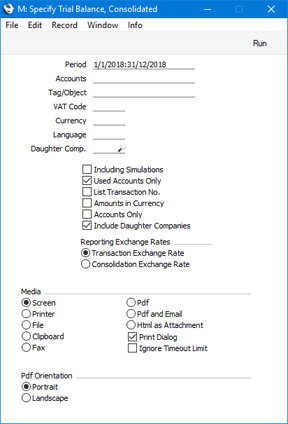
- The specification window for the Trial Balance, Consolidated report contains an additional Include Daughter Companies option. Use this option when you need to produce a consolidated Trial Balance report that includes every Company in the group.
- The specification window for the Trial Balance, Consolidated report contains an additional Daughter Comp. field. If you are running the report from the Mother Company, this field allows you to produce a report showing the contribution made to the consolidated Trial Balance by an individual Daughter Company.
- The figures in the Trial Balance, Consolidated report will usually be in the Group Currency (depending on the Consolidation Exchange Rate option referred to below). When producing the report from the Nominal Ledger, you will be able to choose whether the report will be in Base Currency 1 or Base Currency 2.
- The specification window for the Trial Balance, Consolidated report contains a Consolidation Exchange Rate option. Please refer to the description of the Consolidation Settings setting here for details.
- Include Daughter Companies
- If you are producing a Trial Balance from the Mother Company, select this option if you want to produce a consolidated report that includes Transactions from the Daughter Companies as well as those in the Mother Company. If you do not select this option, a 'standard' Trial Balance will be produced, from the Transactions in the Mother Company only. If you are producing the report from a Company that does not have Daughters, selecting this option will not affect how the report is calculated.
- Daughter Comp.
- Paste Special
Daughter Companies
- If you are producing a Trial Balance from the Mother Company, use this field if you need to produce a report showing the contribution made to the consolidated Trial Balance by an individual Daughter Company. Enter the Company Code of the Daughter Company in this field. You must select the Include Daughter Companies option as well.
- You can only produce a report for a Daughter Company (i.e. for a Company that is listed in the Daughter Companies setting in the Company in which you are working). You cannot use this field to produce a report for a Company on a lower level, such as a Grand-Daughter Company.
- If you produce a report for a Daughter Company that itself has subsidiaries, the report will only include figures from the Daughter Company. It will not be a consolidated report that includes figures from the subsidiary Companies.
- The Accounts in the report will be taken from the Account register in the Mother Company from which you are producing the report. If you have not linked a Daughter Account to a Mother Account (i.e. you have not specified a Consolidation Account for the Daughter Account, or there is no Mother Account with the same Account Number as the Daughter Account), that Daughter Account will not be included in the report.
- If the Daughter Company is partially owned by the Mother, the balance of each Account in which you have selected the Reduce Minorities option will be reduced to the correct percentage in the report.
- You can only produce a report for a Daughter Company (i.e. for a Company that is listed in the Daughter Companies setting in the Company in which you are working). You cannot use this field to produce a report for a Company on a lower level, such as a Grand-Daughter Company.
Reports in the Consolidation module:
- Introduction
- Balance Sheet, Consolidated
- Consolidation
- Consolidation Chart of Accounts
- Correction List
- Discount Statistics, Consolidated
- Key Financial Ratios, Profit & Loss
- Trial Balance, Consolidated
- Home page for Consolidation manual
- Home page for Standard ERP manual