Introduktion till Fält och Variabler
När du skapar en ny rapport, behöver du använda fält och variabler.Fields
A field contains a single piece of information, and is stored in the database. For example, each record in the Customer register contains fields for the Customer Number and Customer Name. When you create a Customer record, you will enter information in these fields. This information is retained permanently, unless you change it or delete the record.A field has an internal name and a label. It is unlikely that these will be the same. The label is the name given to the field on screen, so that the user knows what sort of information should be entered there. The internal name is the name given to the field inside the program. The label and the internal name are usually different because the internal name cannot contain spaces, full stops or other unusual characters, and cannot be translated into different languages. When creating reports, you will need to use the internal name of each field. Usually, you will be able to choose a field from a 'Paste Special' list. You can also obtain a full list of internal field names by printing the Export/Import Format report in the Technics module. You cannot create new fields in the Report Generator.
Variables
A variable differs from a field in that it is temporary. Both the variable itself and the information it contains remain in memory while they are needed, but are lost once they have been used. For example, specification windows of reports, documents and maintenance functions all contain variables. If you are producing a Customer List and you specify that you want to list Customers belonging to the "CUST" Category, you will type "CUST" into a variable in the specification window. This information is retained while the report is on screen or being printed, but is not stored anywhere afterwards.Variables also differ from fields in that you can create them in the Report Generator. In fact, you will need to create variables to make the most of the capabilities of the Report Generator. Most often, you will need variables if you want to place search criteria in specification windows, keep running totals of any kind, and bring information in from another register.
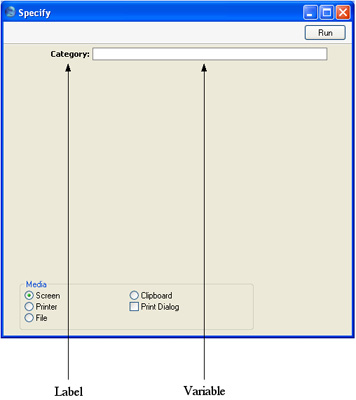
As with fields, variables have both labels and internal names. A variable must have an internal name, but it only needs a label if it's being shown on screen in a specification window as illustrated below.
Field and Variable Types
Each field has its own Type, signifying the nature of the information that it contains. For example, the Type of the Customer Name field is string, allowing it to contain both alpha and numeric characters. An Invoice Total field is a decimal field, so it can only contain numbers with decimals.Each variable has its own Type as well. When you create a variable, it will often be given a Type automatically. But in one case (when you create a variable using the [Variable] button), you will have to give it a Type yourself. For example, in a list of Invoices you might create a variable to calculate and display the total outstanding value of all the Invoices in the report. This must be a decimal variable, because it will contain numbers with decimals and because it will take its information from the Total field in each Invoice, which is a decimal field. A variable counting the number of Invoices in the list will be an integer variable, because it will only ever contain whole numbers. In a Customer List report, a variable in the specification window that allows the user to search for Customers belonging to a particular Category must be a string variable because the Category field in the Customer record is a string field. The variable containing a search criterion must have the same Type as the field being searched.
The various Types are:
- Boolean
- Can only have two values, 1 and 0 (zero). Boolean fields and variables are usually shown as check boxes on screen
- Date
- Dates
- Decimal
- Numbers with decimals
- Integer
- Whole numbers
- Long
- Whole numbers greater than 32,000
- Record
- Entire records
- Row
- Single rows within a record (e.g. an Invoice row)
- String
- Any combination of alpha and numeric characters
- Time
- Times