Definition of Reports
The appearance and format of some reports can be changed to suit your specific requirements. This is known as changing the report's definition. The reports for which this facility is available are the Balance Sheet, the Profit & Loss Report and the VAT Report.To change a report definition, first select 'Settings' from the File menu and double-click 'Report Settings' in the subsequent list. Then, highlight a report name in the list on the left-hand side of the 'Report Settings' window and click the [Definition] button. The subsequent definitions windows are described on the pages covering the particular reports.
! | If you have modified the standard Chart of Accounts or imported your own, you must change the report definitions accordingly. |
Drill-down
FirstOffice has a unique drill-down feature in some of the reports when they are printed to screen. For example, when you have a Profit & Loss statement on the screen, you can click on any of the Account numbers in the report. The Nominal Ledger report for the same Account and period is then opened in a separate window, showing all the Transactions that constitute the total amount on the P&L statement. If you then click on one of the Transaction Numbers in the Nominal Ledger report, the Transaction record will open, showing all the details recorded for the event. This example is illustrated below: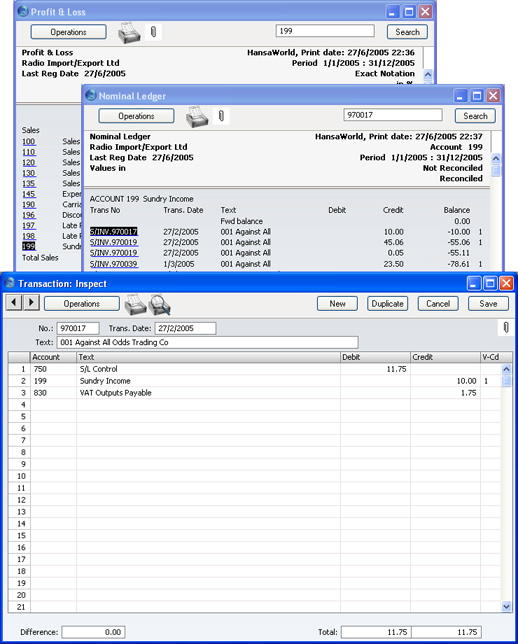
Operations Menu