Introduction to Settings and the Stock Locations Value Pack
The Stock Locations Value Pack adds one new setting to the Stock module, and also adds new options to the Account Usage Stock, Cost Accounting and Stock Settings settings.Account Usage Stock
The Stock Locations Value Pack adds the following option to the Account Usage Stock setting in the Stock module: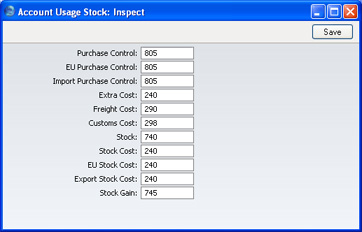
- Stock Gain
- Paste Special
Account register, Nominal Ledger/System module
- This Account is used by the Stock Movement register to book value differences from internal stock transfers between stock Locations.
Cost Accounting
The Stock Locations Value Pack adds the following option to the Cost Accounting setting in the Stock module: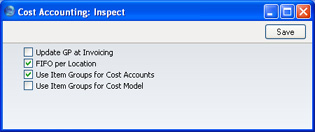
- FIFO per Location
- FirstOffice offers two methods by which FIFO schedules can be maintained.
- In the first method, a single FIFO schedule is maintained, irrespective of the number of Locations. This method might be appropriate in situations where there are no Locations, or where the Locations represent different rooms or shelves in the same building. When you remove Items from stock using Deliveries and Invoices, the oldest Items are always removed, irrespective of the Location in which they are stored or specified on the Delivery or Invoice. You can move Items from Location to Location using Stock Movements, but their value will not be changed. To use this method, ensure this check box is switched off.
- The second method is to maintain separate FIFO schedules for each Location. This method will be appropriate where the Locations represent separate buildings or warehouses. When you remove Items from stock using Deliveries or Invoices, the oldest Items in the specified Location are removed. You can move Items from Location to Location using Stock Movements, and you can change their value, perhaps to reflect the cost of the transfer. To use this method, ensure this check box is switched on.
- It is recommended that you switch this option on if you will be using FirstOffice's Locations feature. It is also recommended that you either switch on the Require Location option or specify a Main Location (both in the Stock Settings setting in the Stock module). This will ensure that you will always have to specify a Location when adding or removing stock.
- Once you have made a decision as to whether you want to use the FIFO per Location feature, you should not change the state of this check box. If you switch the option on or off once you have started using the Stock module, it is very likely that inaccuracies will be introduced to the FIFO schedule. If you do wish to change the status of this check box, it is recommended that you do so in a new database created at a convenient time such as the beginning of a financial year.
- When you produce a Stock List report, the report option you should use will depend on whether you are using the FIFO per Location option. Please refer to this page for details.
- In the first method, a single FIFO schedule is maintained, irrespective of the number of Locations. This method might be appropriate in situations where there are no Locations, or where the Locations represent different rooms or shelves in the same building. When you remove Items from stock using Deliveries and Invoices, the oldest Items are always removed, irrespective of the Location in which they are stored or specified on the Delivery or Invoice. You can move Items from Location to Location using Stock Movements, but their value will not be changed. To use this method, ensure this check box is switched off.
Number Series - Stock Movements
This setting allows you to define number sequences to be used by the new Stock Movement register. It operates in the same manner as the other Number Series settings: please refer to the description of the Number Series - Goods Receipts setting for details.Stock Settings
The Stock Locations Value Pack adds the following options to the Stock Settings setting in the Stock module: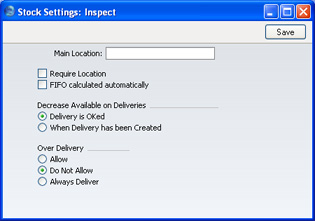
- Main Location
- Paste Special
Location register, Stock module
- If you specify a Location here, it will be used by default wherever a Location is required and left blank. For example, Items on a Goods Receipt record without a Location will be treated as being stored in the Main Location.
- If you are not using the Require Location option (below) and you change the Main Location, you must create a back-up file and import it into a new database before entering any further stock transactions. This will have the effect of moving all stock from the old Main Location to the new one, because all stock transactions with a blank Location will then be treated as referring to the new Main Location. If in reality the stock in the old Main Location remains there, you should then move it back to that Location using Stock Movements.
- A special case of this is the specifying of a Main Location for the first time. In this case, stock that has previously been entered without a Location will be treated as being in the Main Location once you have completed the updating procedure described above.
- If you do not follow this updating procedure when you change the Main Location, and instead move stock from the old Main Location to the new one by Stock Movement, stock levels will be rendered inaccurate the next time you create a back-up file and import it into a new database (e.g. when updating to a new version of FirstOffice). You will be able to correct this inaccuracy by reversing the Stock Movement. Do not put off following the updating procedure because you do not want all stock to be moved from the old Main Location to the new one, as this will happen anyway the next time you import a back-up file into a new database (e.g. when updating).
!
If you are not using the Require Location option and you change the Main Location, create a back-up file and import it into a new database straight away.
- If you are not using the Require Location option (below) and you change the Main Location, you must create a back-up file and import it into a new database before entering any further stock transactions. This will have the effect of moving all stock from the old Main Location to the new one, because all stock transactions with a blank Location will then be treated as referring to the new Main Location. If in reality the stock in the old Main Location remains there, you should then move it back to that Location using Stock Movements.
- Require Location
- If you are using this option, you will have to specify a Location in all stock transactions (such as Deliveries and Goods Receipts) and Invoices. If you are not using this option and you do not specify a Location in a transaction, that transaction will be treated as affecting any Location entered in the Main Location field above.
- If you have not specified a Main Location, it is recommended that you use this option. It removes the risk of forgetting to specify a Location in a transaction: the 'blank' Location is treated as a separate Location in FirstOffice. You can receive goods in and issue goods from the 'blank' Location and use it in Stock Movements, but you cannot produce reports that are restricted to the 'blank' Location only. Leaving the Location field empty in a report specification window means 'report on all Locations' (including the 'blank' one).
- If you have specified a Main Location, it is recommended that you do not use this option. This option will force you to specify a Location in every stock transaction, and therefore the Main Location will never be used.
- If you have not specified a Main Location, it is recommended that you use this option. It removes the risk of forgetting to specify a Location in a transaction: the 'blank' Location is treated as a separate Location in FirstOffice. You can receive goods in and issue goods from the 'blank' Location and use it in Stock Movements, but you cannot produce reports that are restricted to the 'blank' Location only. Leaving the Location field empty in a report specification window means 'report on all Locations' (including the 'blank' one).
- FIFO Calculated Automatically
- This check box controls the behaviour of the Stock Movement screen. When you specify an Item in a Stock Movement, its FIFO or Weighted Average value does not appear immediately. If you are not using this option, the FIFO or Weighted Average value will only appear when the Stock Movement is approved and saved. Otherwise, it will appear when the Stock Movement is saved for the first time (irrespective of whether it has been approved), and it will be updated on each subsequent saving.
- It is usually recommended that you use this option: you should only switch it off in specialise accounting situations.