Introduction
The FirstOffice system consists of several modules which interact with each other in many ways. Each module uses a number of registers, or files, in which information of a particular type is stored. For example, all information about Customers is stored in a Customer register, all information about Items is stored in an Item register and so on.The following illustration shows the registers available in each FirstOffice module:
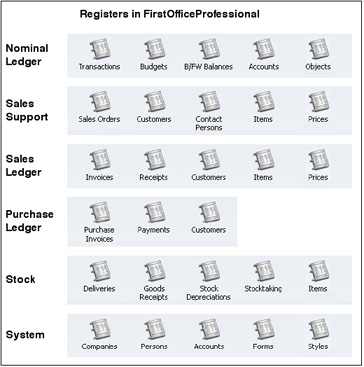
In addition to the registers, each module has several smaller files known as 'Settings'. The difference between a setting and a register lies in the frequency and nature of use. The information with which you will be working daily, such as Customers and Suppliers, Sales Orders and Invoices, tends to be stored in registers, while information stored in settings tends to be used in 'look-up' tables or used to determine the manner in which a particular function operates.
Workflow
The administration of a company is always associated with a certain flow of tasks and work. In a typical trading company, items are purchased from a group of suppliers, goods are received and put into stock, sales orders are processed, stock levels are checked, goods are shipped and invoices issued, and payments are made and received. All transactions are logged and recorded, and financial events are recorded in the accounting subsystem.A modern financial system like FirstOffice is designed to automate as many administrative tasks as possible. If information is entered in one part of the system, there should be no need to enter it again elsewhere. Information should be recorded for re-use, and it should be available throughout the system.
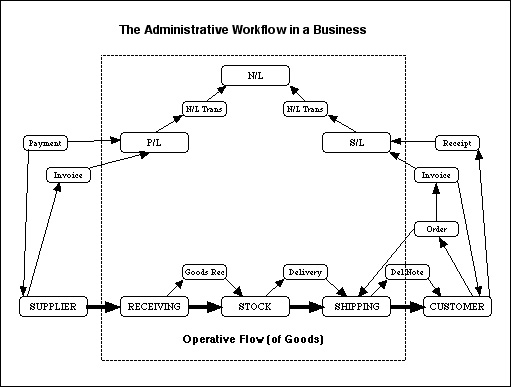
One of the tasks of the administration is to keep the organisation's "memory". This is done with the help of files and registers, where information about business events is kept. The following picture shows the same structure as above, but the messages have been removed and are replaced by the registers kept by the business.
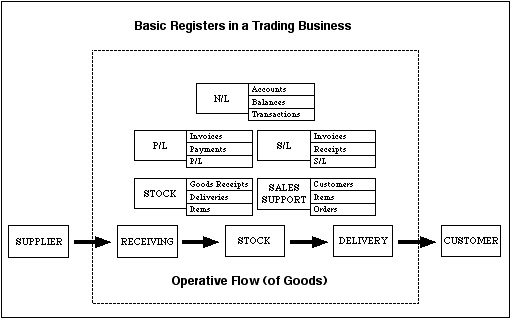
FirstOffice is an integrated accounting system. The different parts of the system interact with each other. The Sales Ledger is for example integrated with the Nominal Ledger so that as soon as an Invoice has been approved, all ledgers in the company's accounts are automatically updated. This interaction is immediate, and covers the entire accounting system. All registers, ledgers and reports are updated for all users.
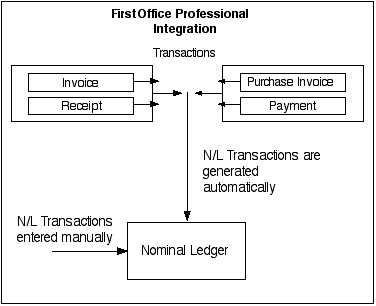
In many cases, this integration means that you, the user, will not notice the actual creation of Nominal Ledger Transactions from the Sales and Purchase Ledgers. These Transactions constitute about 80% of the Nominal Ledger transactions in a manual system - you simply can forget them, together with all the hassle of reconciling the ledgers with each other. FirstOffice does all this automatically. The picture below illustrates the integration process.
Multi-year Database
FirstOffice uses a multi-year database. This means that Transactions, Invoices etc. from several years are stored in the same database. Closing balances for all accounts at the end of one financial year are automatically converted into opening balances for the beginning of the next. The multi-year database thus simplifies your end-of-year procedures.FirstOffice's database is continuous. Transactions are stored continuously, with no periods fixed in advance. It is possible to extract reports for completely arbitrary periods. When you finally reconcile a particular period, you can close it for further entries. However, you can have as many periods open as you wish.
Each set of transactions has its own Number Series. There is no limit to the number of series, which can be set up in each module using the 'Settings' function.