Weeks
This page describes the Weeks setting in the System module.
---
The Weeks setting is where you should define the Week Numbers that are shown in the six-monthly and monthly Calendar views and the Resource Planner. Week Numbers can vary from country to country and depending on when the year started.
To work with the Weeks setting, first ensure you are in the System module. Then, if you are using Windows or macOS, click the [Settings] button in the Navigation Centre and then double-click 'Weeks' in the 'Settings' list. If you are using iOS or Android, select 'Settings' from the Tools menu (with 'wrench' icon) and tap 'Weeks' in the 'Settings' list. The 'Weeks: Browse' window will open, listing the records that have already been entered.
Double-click (Windows/macOS) or tap (iOS/Android) on a line to open the edit window, or add a new record by selecting 'New' from the Create menu (Windows/macOS) or the + menu (iOS/Android). When the record is complete, click the [Save] button (Windows/macOS) or tap √ (iOS/Android) to save it, or use the close box (Windows/macOS) or < (iOS/Android) to close it without saving changes.
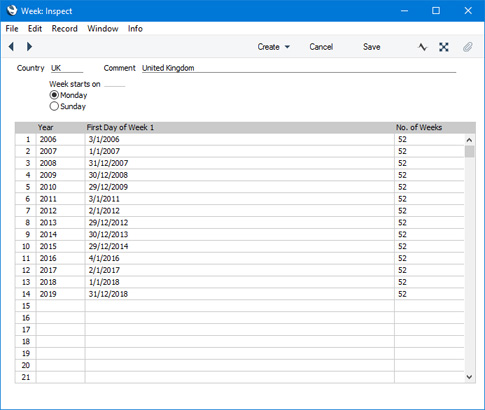
Usually you will only need one record in this setting. The Country in this record should be the Country specified in the
Company Info setting. Complete the grid for each year of use as shown in the illustration (there is no need to have the years in order, but you should only enter each year once). Add new years to the matrix in the existing record as this becomes necessary.
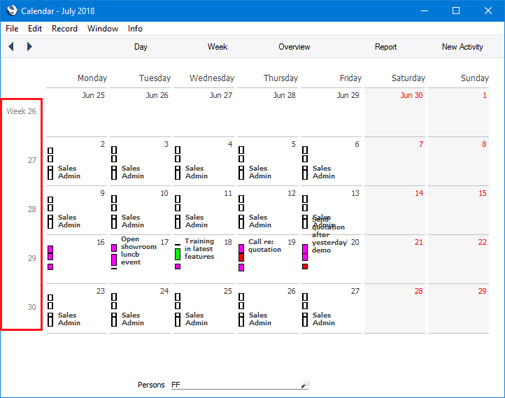
If there is an up-to-date record in the Weeks setting with the correct Country, Week Numbers will be displayed in the six-monthly and monthly Calendar views and the Resource Planner:
---
Settings in the System module:
- Access Groups
- Active Users
- Auto Actions
- Bank Holidays
- Base Currency
- Base Currency Rates
- Cloud Security
- Company Date and Numeric Format
- Company Info
- Configuration
- Conversions - Master, Conversions - Accounts and VAT Code
- Conversions - Master, Conversions - Activity Types
- Conversions - Master, Conversions - Contact Classifications
- Conversions - Master, Conversions - Contacts
- Conversions - Master, Conversions - Currency Codes
- Conversions - Master, Conversions - Items
- Conversions - Master, Conversions - Locations
- Conversions - Master
- Conversions - Master, Conversions - Suppliers
- Conversions - Master, Conversions - Tags/Objects
- Conversions - Master, Conversions - Users
- Countries
- Countries Regions
- Currency Round Off
- Days and Months
- Departments
- Discount Options
- Display Groups
- Exchange Rates Settings
- Form Settings
- Global Warnings on UnOKed Records
- Internet Enablers
- Journaling
- KPIs
- Languages
- Locking
- Locking Exceptions
- Nature of Business
- Number Series Defaults
- Opened Windows History
- Optional Features
- Password Security
- Printers
- Reporting Periods
- Round Off
- Sales Groups
- Single Functions
- Special Days
- Styles
- Sub-Ledger Control Accounts
- Task Manager Access
- User Warnings on UnOKed Records
- Values in Text
- VAT Reg. Number Masks
- Weeks
Go back to: