
|
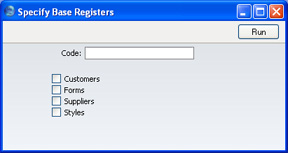
Search HansaManuals.com HansaWorld FirstOffice Start >> Exports >> Base Registers Anterior Siguiente Este texto se hace referencia a la versión del programa 4.3 Base Registers You can use this function to export records from the Base Registers. This is a practical tool for use when you want to create a new Company that will use the same basic information as your existing ones.You can save much work by simply copying repeated data and afterwards changing whatever is different between the two Companies. The Base Registers export is saved as an ordinary text file and you can import it to the new Company using the 'Automatic' or 'Automatic manual file search' Import functions. Click the [Exports] button in the Master Control panel and double-click 'Base Registers' in the 'Exports' list. The 'Specify Base Registers' window is opened:
A message window informs you about the progress of the export process. The process can be interrupted at any time by pressing Esc (Windows) or ⌘-Period (Macintosh). Anterior Siguiente Arriba |