Account Usage Stock - Stock Card
This page describes the fields on the 'Stock' card of the Account Usage Stock setting. Please follow the links below for descriptions of the other cards:
---
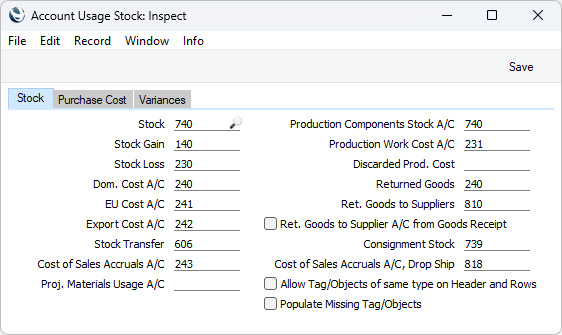
Each of the fields on the 'Stock' card requires you to enter an Account Number. In each case, you can use the 'Paste Special' function to help you choose the correct Account.
- Stock
- The stock control Account. If you are using maintaining stock values in the Nominal Ledger ('cost accounting'), this Account will be debited when you receive goods into stock and credited when you remove them from stock, if you have not specified a Stock Account for the relevant Location or Item Group.
- Please refer to the Cost Accounting page for full details about this feature.
- Stock Gain, Stock Loss
- If you enter a Stock Movement that causes the value of an Item to change (because you have entered a value in the R. Extra Cost or S. Extra Cost fields in the relevant row), the change in value will be posted to the Stock Gain Account (if the value has increased) or to the Stock Loss Account (if it has been reduced). The Stock Movement register allows you to record internal stock transfers between stock Locations. The Stock Loss Account will also be debited by default from Stock Depreciation records, while the Stock Gain Account will be credited by default from Goods Receipts created by the 'Stocktaking Comparison' Maintenance function.
- Dom. Cost A/C, EU Cost A/C, Export Cost A/C
- Cost (or Cost of Sales) Account used when removing Items from stock. If you are using cost accounting, this Account will be debited upon Invoice or Delivery, if the equivalent field for the appropriate Item Group is blank. You should specify three separate Cost Accounts, one for each VAT Zone.
- Please refer to the Cost Accounting (Cost of Sales) Postings from Deliveries and Invoices page for full details about how the Cost of Sales Account will be chosen in an individual transaction.
- You can change the name of the EU Cost A/C field if it is not suitable. Using the VAT Zone Label setting in the Sales Ledger, you can replace the string "EU" with your own string (for example "SACU" in South Africa).
- Stock Transfer
- The Stock Transfer register in the Internal Stock module allows you to transfer Items from sales stock to internal stock. This will be necessary if, for example, you purchase an Item that you will not sell but instead will offer for rent. As part of the transfer, you will move the Item from a stock Location to a rental Location. A Stock Transfer record will credit a Stock Account (chosen in the usual way for an outgoing stock transaction) and by default will credit the Stock Account specified for the To Location or, if you have not specified a Stock Account for the To Location, the Stock Transfer Account specified in this field. You will be able to override this default in an individual Stock Transfer record. Please refer here for more details about Stock Transfers.
- Cost of Sales Accruals A/C
- If you are using the Sales Orders module, you will usually issue a Delivery to remove the ordered Items from stock, and then issue an Invoice. Using the Cost of Sales Posting options in the Cost Accounting setting, you can specify whether the cost of sales postings will be made from the Invoices, from the Deliveries or from the Invoices with Accruals from the Deliveries.
- If you choose the Invoices with Accruals from the Deliveries option, the posting of cost of sales will be a two-stage process. The Stock Account will be credited by the Delivery, and a Cost of Sales Accrual Account will be debited. From the Invoice, the Cost of Sales Accrual Account will be credited, and the Cost of Sales Account will be debited. Specify here the Cost of Sales Accrual Account that you need to be used in this process.
- Proj. Materials Usage A/C
- This field allows you to specify a dedicated Account that will be debited with the calculated cost of Stocked Items when you remove them from stock using Deliveries that are connected to Projects.
- This can be useful when carrying out long-term Projects (e.g. building or construction Projects) where the Invoices will not be detailed and will not individually list the Items and materials that were used. In this circumstance, it can be desirable to post the costs of the materials to an Account dedicated to materials used for Projects rather than a Cost of Sales Account.
- The Project Materials Usage Account will be chosen as follows:
- It will be taken from the IItem record.
- If you are using the Use Item Groups for Cost Accounts option in the Cost Accounting setting in the Stock module, it will be taken from the Item Group to which the Item belongs.
- It will be taken from this field in the Account Usage Stock setting.
- If you have not specified any Project Materials Usage Accounts, then Cost Accounts for Items removed from stock using Deliveries that are connected to Projects will be chosen in the same way as in other removals from stock (e.g. normal Deliveries and Invoices) i.e. they will be chosen as described on the Cost Accounting (Cost of Sales) Postings from Deliveries and Invoices page.
- Production Components Stock A/C
- The Account specified here will be credited with the total Input Cost and debited with the total Output Cost whenever you mark a Production record as Finished, providing you have not specified any Stock Accounts for the relevant Location or Item Groups. Production records (used to assemble Stocked Items from components) are fully described here, and Nominal Ledger Transactions from Productions are described here.
- Production Work Cost A/C
- The Account specified here will usually be credited with the total Work Cost whenever you mark a Production record as Finished and save it. Usually, this will be the cost of labour required to build the assembled Items and you will have entered it in the W-cost field in one of the Input rows in the Production. However, if you are using the Use Item Groups for Cost Accounts option in the Cost Accounting setting and you enter the Work Cost in a row in the Production with an Item belonging to an Item Group in which you have specified a Prod. Work Account, then that Account will be used instead.
- If any Input Items in a Production are Plain or Service Items, they will be treated as Work Cost. Their value will also usually be credited to the Production Work Cost Account specified here. Again, if you are using the Use Item Groups for Cost Accounts option and if a Plain or Service Item belongs to an Item Group in which you have specified a Prod. Work Account, then that Account will be used instead.
- Discarded Prod. Cost
- This Account will be debited with the costs of a Production when you mark it as Finished but Discarded. The Production Components Stock Account will still be credited with the Input Costs and the Production Work Cost Account with the Work Cost as described above.
- Returned Goods
- When a Customer returns an Item, you will receive it back in stock by creating a record in the Returned Goods register. When you mark the Returned Goods record as OK and save, the Accounts specified on flip B of each row will be credited in the subsequent Nominal Ledger Transaction. If you remove the Account from flip B in any row, this Returned Goods Account will be credited instead.
- Ret. Goods to Suppliers
- When you return an Item to its Supplier, you will record the return in the Returned Goods to Supplier register. When you mark the Returned Goods to Supplier record as OK and save, the subsequent Nominal Ledger Transaction can debit a dedicated Returned Goods to Supplier Account, or it can debit the Purchase Accruals Account credited by that original Goods Receipt. If you would like it to debit a dedicated Account, specify that Account here and do not select the Ret. Goods to Supplier A/C from Goods Receipt option immediately below.
- If you then create a Credit Note from the Returned Goods to Supplier record, this Account will be used in place of the standard Purchase Accruals Account in that Credit Note, and will be credited from the Credit Note.
- Ret. Goods to Supplier A/C from Goods Receipt
- When you return an Item to its Supplier, you will record the return in the Returned Goods to Supplier register. Usually, you will create a Returned Goods to Supplier record from the Goods Receipt that you used to receive the Item into stock. When you mark the Returned Goods to Supplier record as OK and save, the subsequent Nominal Ledger Transaction can debit a dedicated Returned Goods to Supplier Account (specified above), or it can debit the Purchase Accruals Account credited by that original Goods Receipt. If you want to credit the original Purchase Accruals Account, select this option.
- If you then create a Credit Note from the Returned Goods to Supplier record, the original Purchase Accruals Account will be the Cost Account in the Credit Note.
- Consignment Stock
- A Consignment Stock Item is one that you receive from a Supplier that will remain the property of the Supplier until you sell it. The Supplier will therefore not issue a Purchase Invoice until you sell the Item. The Item never belongs to you: it remains the property of the Supplier until you sell it.
- As you do not own a Consignment Stock Item, you cannot include it in your stock valuation. So, when you receive the Item, a dedicated Consignment Stock Account should be debited, and when you move it out of stock the same Account should be credited.
- If you need to use the Consignment Stock feature, use this field to specify which Account is to be used as the dedicated Consignment Stock Account. Please refer here for more details about the Consignment Stock feature.
- Cost of Sales Accruals A/C, Drop Ship
- If you receive a Sales Order from a Customer for an Item that you do not have in stock, you will need to order the Item from your Supplier. Usually, the Supplier will deliver the Item to you and you will then deliver it to the Customer, but an alternative is to have the Supplier deliver the Item directly to the Customer. This is known as "Drop Shipping".
- If you arrange a Drop Shipment, the Items in question will not pass through your stock system. Instead of a Delivery, you will need to create a separate transaction known as a "Shipment Notification" to register that the Items have been delivered directly to the Customer.
- If you have specified in the Cost Accounting setting in the Stock module that cost of sales postings will be created from Deliveries, cost of sales postings for Drop Shipments will be made from Shipment Notifications, with the Cost of Sales Account being chosen as normal. However, if you have specified that cost of sales postings will be created from Invoices or from Invoices with Accruals from Deliveries, cost of sales postings for Drop Shipments will be made in two stages. First, the Cost of Sales Accruals A/C, Drop Ship that you specify here will be debited from each Shipment Notification. Then, from the Invoice, the Cost of Sales Accruals A/C, Drop Ship will be credited, and the usual Cost of Sales Account will be debited.
- Please refer here for more details about Drop Shipments and Shipment Notifications.
- Allow Tag/Objects of same type on Header and Rows
- It is usually a rule that you can only use one Tag/Object belonging to a particular Tag/Object Type in a particular record. In any stock record, you will be able to specify different Tags/Objects belonging to a particular Tag/Object Type in different rows, but this rule means that you will not be able to do so in the header of the record and in any of the rows.
- In some circumstances, you may find this to be unnecessarily restrictive. If so, select this Allow Tag/Objects of same type on Header and Rows option. This will allow you to use a Tag/Object belonging to a particular Tag/Object Type in the header of a stock record and a different Tag/Object belonging to the same Tag/Object Type in a row. It will not allow you to use two Tags/Objects belonging to the same Tag/Object Type in the header or in any row. If the header and row Tags/Objects will be merged for any posting (e.g. the header and row Tags/Objects in a Delivery will all be assigned to the debit posting to a Cost of Sales Account) and the merged set of Tags/Objects includes Tags/Objects belonging to the same Tag/Object Type, the Tag/Object from the row will be used and the one from the header will be discarded.
- Similar options exist in the Account Usage S/L setting (applies to Sales Invoices) and the Account Usage P/L setting (applies to Purchase Invoices).
- Populate Missing Tag/Objects
- There will be occasions when Nominal Ledger Transactions created from Sub System records (e.g. from Deliveries and Goods Receipts) will include additional postings such as postings to record round off or Exchange Rate differences. By default, no Tags/Objects will be assigned to these postings. Select this option if you would like the Tags/Objects in the Sub System record header to be assigned to these postings. For example, if you have selected this option the Tags/Objects in the header of a Goods Receipt (on the 'Terms' card) will be assigned to any postings recording round off in the resulting Transaction.
- Selecting this option will in fact assign the Tags/Objects in the Sub System record header to every posting in the resulting Transaction that would otherwise be without Tags/Objects. If you are not using the Tag/Object on Stock Account option in the Cost Accounting setting, this will include postings to the Stock Account. However, selecting this Populate Missing Tag/Objects option is not the same as selecting Tag/Object on Stock Account, because Tag/Object on Stock Account will assign both header and row Tags/Objects to postings to the Stock Account.
- This option affects Nominal Ledger Transactions created from Deliveries, Goods Receipts, Returned Goods records, Returned Goods to Supplier records, Stock Depreciation records and Stock Revaluation records. Similar options exist in the Account Usage S/L setting (applies to Transactions created from Sales Invoices and Receipts) and the Account Usage P/L setting (applies to Transactions created from Purchase Invoices and Payments).
The Account Usage Stock setting:
|


 Introduction to Settings in the Stock Module
