ASG Labels
This page describes the 'ASG Labels' Export function in the Stock module. This Export function will only be available if the VAT Law in the
Company Info setting in the System module is set to "Swedish".
---
The 'ASG Labels' Export function exports information from Deliveries in a format that is used in Sweden. Please refer to your local HansaWorld representative for further details.
You can produce ASG Label export files using the following methods:
- Open an individual Delivery in a record window and select 'ASG Export' from the Operations menu (Windows/macOS) or Tools menu (iOS/Android). The 'ASG Export' function will only be visible on the Operations or Tools menu in Sweden.
- Ensure you are in the Stock module and click (Windows/macOS) or tap (iOS/Android) the [Routines] button in the Home Screen and then click or tap [Exports]. Double-click or tap 'ASG Labels' in the resulting list.
In both cases, the following specification window will open:
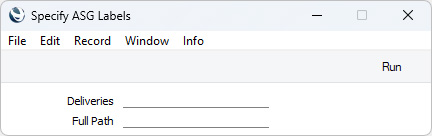
- Deliveries
- Range Reporting
Numeric
- Enter a Delivery Number to print a single Delivery, or a range of Delivery Numbers separated by a colon (:).
- If you are producing an ASG Label export file from an individual Delivery (method 1 above), the relevant Delivery Number will be placed here as a default.
- Separate text files will be created for each Delivery in the range. The files will be named x.txt where x is the Delivery Number.
- Full Path
- Use this field to specify where the files will be saved. If you leave this field empty, the path will be taken from the Export Path for Autonamed Backups field in the Payment Settings setting in the Purchase Ledger.
---
Go back to:



