|
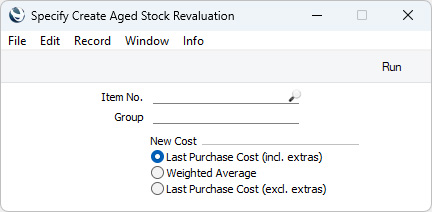
Search HansaManuals.com HansaManuals Home >> Standard ERP >> Stock >> Maintenance Previous Next Entire Chapter in Printable Form Search This text refers to program version 2026-06-25 Aged Stock Revaluation This page describes the 'Aged Stock Revaluation' Maintenance function in the Stock module.--- If you have held some Items in stock for a long time, there may be circumstances where you need to change the value of that stock. If so, you can use the 'Aged Stock Revaluation' Maintenance function to create a record in the Stock Revaluation register that you can then use to implement the change in value. The function will search for Stocked Items that you currently have in stock and will then create a Stock Revaluation record containing those Items. If you have stock of an Item in more than one Location, separate rows for each Location will be included in the new Stock Revaluation record. To use this function, ensure you are in the Stock module and then open the 'Maintenance' list by clicking (Windows/macOS) or tapping (iOS/Android) the [Routines] button in the Home Screen and then the [Maintenance] button in the subsequent window. Double-click or tap 'Aged Stock Revaluation' in the resulting 'Maintenance' list. The specification window illustrated below will open:
If the function does not create a Stock Revaluation when expected, the probable cause is that there is no valid record in the Number Series - Stock Revaluations setting. This problem will usually occur at the beginning of a new year. --- Go back to:
|