|
Search HansaManuals.com HansaManuals Home >> Standard ERP >> Stock >> Stock Movement Register Previous Next Entire Chapter in Printable Form Search This text refers to program version 2026-06-25 Entering a Stock Movement To open the Stock Movement register, ensure you are in the Stock module and then click (Windows/macOS) or tap (iOS/Android) the [Registers] button in the Home Screen. Double-click or tap 'Stock Movements' in the resulting list. The 'Stock Movements: Browse' window will be opened, showing the Stock Movements that you have already entered:70 By default, the Stock Movements will be listed in transaction number order. If you are using Windows or macOS, you can change the sort order by clicking on one of the other column headings. To reverse any sort, simply click once again on the column heading. The current sort order is marked by the column heading being coloured blue. If you are using iOS or Android, tap on the column heading and choose the sort order you need. Repeat the procedure to reverse the sort. If you need to save a sort order so that it will be used automatically the next time you open the 'Stock Movements: Browse' window, sort the list into the order that you need and then select 'Save Position' from the Window menu (Windows/macOS) or tap the column heading again and choose 'Save sort order' (iOS/Android). If you are using Windows or macOS, there will be three buttons in the top left-hand corner of the 'Stock Movements: Browse' window. These are part of the Limited Access feature. You can use them as follows (Windows versions of the buttons illustrated on the left, macOS on the right):
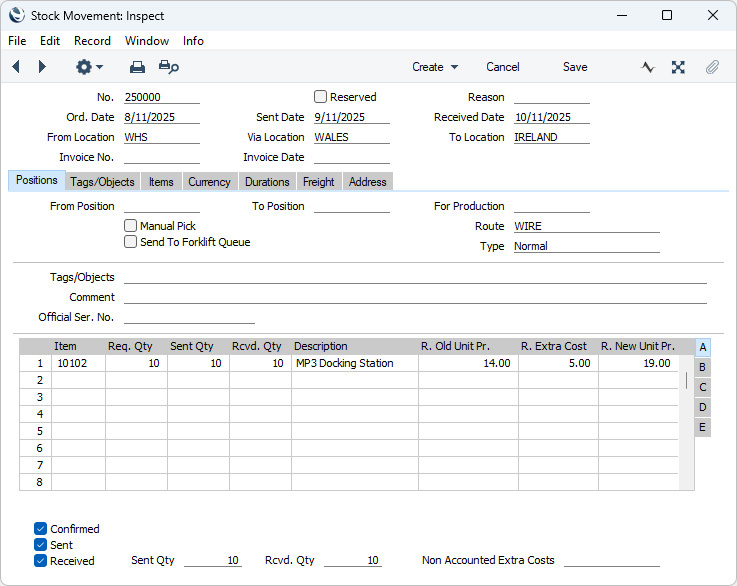
Please refer to the page describing the 'Access' card of the Person register for full details about the Limited Access feature. To enter a new Stock Movement, select 'New' from the Create menu (Windows/macOS) or from the + menu (iOS/Android). Alternatively, if a Stock Movement already exists that is similar to the one you are about to enter, find it in the list, highlight it and select 'Duplicate' from the same menu. The 'Stock Movement: New' window is opened, empty if you clicked [New] or containing a duplicate of the highlighted Stock Movement.
The Stock Movement register in Standard ERP:
|