|
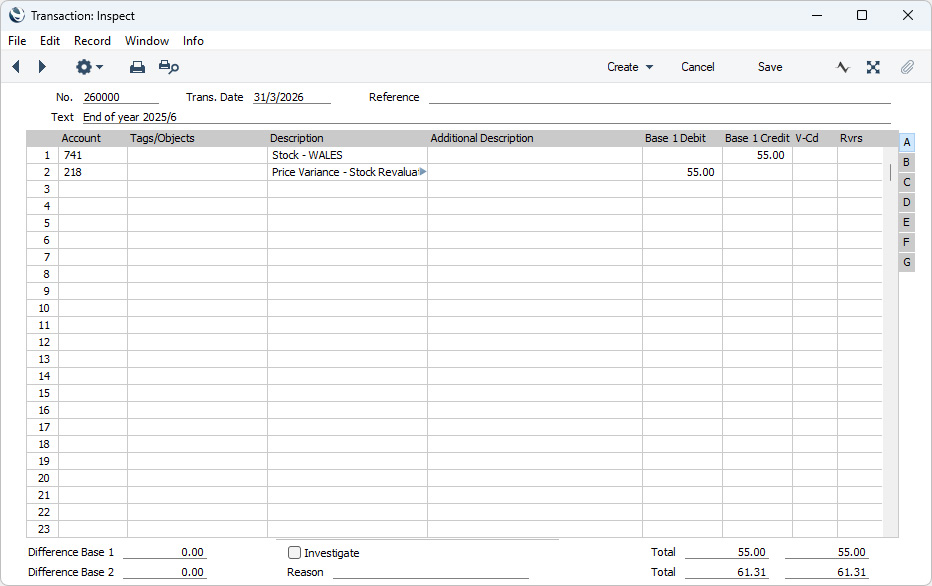
Search HansaManuals.com HansaManuals Home >> Standard ERP >> Magazyn >> Stock Revaluation Register Poprzednia Następna Wersja do wydruku Szukaj Opis dotyczy systemu HansaWorld Enterprise wersja 2026-06-25 Nominal Ledger Transactions from Stock Revaluations When you mark a Stock Revaluation as OK and save it, a Nominal Ledger Transaction will be generated automatically if you have so determined in the Sub Systems setting in the Nominal Ledger and in the Number Series - Stock Revaluations setting. An example Nominal Ledger Transaction created from a Stock Revaluation record is shown below.
The Variance Account(s) in the Nominal Transaction will be the Account specified in the Var. A/C field in the header of the Stock Revaluation record. By default, this will be the Stock Revaluation Variance Account specified in the Account Usage Stock setting. If you have entered a Stock Revaluation Variance Account in a particular row, that Account will be used instead of the Account entered in the header. The Stock Account(s) in the Nominal Transaction will be determined as follows:
Tags/Objects for the Location will be assigned to all postings to the Stock Account. If you have selected the Tag/Object on Stock Account option in the Cost Accounting setting, the Tags/Objects specified in the header of the Stock Revaluation will be assigned to these postings as well and to any postings to the Variance Account (unless you are using the Skip Header A/C Tags/Objects on Cost A/C option in the Account Usage P/L setting in the Purchase Ledger). Any Tags/Objects specified on flip D of a Stock Revaluation row will be assigned to the posting to the Stock Account and to the posting to the Variance Account, providing in both cases that you are using the Tag/Object on Stock Account option. If you have not specified Tags/Objects for your Locations and you are not using the Tag/Object on Stock Account option, no Tags/Objects will be assigned to any postings unless you have selected the Populate Missing Tags/Objects option in the Account Usage Stock setting, in which case Tags/Objects specified in the header of the Stock Revaluation but not the row Tags/Objects will be assigned to all postings. Once the Transaction has been generated, you can look at it straight away using the 'Open NL Transaction' function on the Operations menu (subject to access rights set in the Access Groups setting in the System module). --- The Stock Revaluation register in Standard ERP:
|