Introduction to Settings in the Stock Module
Account Usage Stock
Barcodes
Base Price Changes
Batch Specifications
Cost Accounting - Part 1
Cost Accounting - Part 2
Delivery Packages
Freight Companies
Item Varieties
Item Variety Groups
Items
Location Accounts
Location Classification Types
Location Classifications
Location Groups
Locations
Minimum Stock Levels
Number Series - Deliveries
Number Series - Goods Receipts
Number Series - Returned Goods
Number Series - Returned Goods to Supplier
Number Series - Stock Depreciations
Number Series - Stock Movement Invoices
Number Series - Stock Movements
Number Series - Stock Revaluations
Number Series - Stocktaking
Pack Types
Positions
Picking Lists
Recipes
Returned Goods Settings
Routes, Routes/Locations
Serial Number Tracking
Sources
Stock Movement Durations
Stock Revaluation Settings
Stock Settings - Part 1
Stock Settings - Part 2
Structured Items
Supersession Items
User Defined Field Labels - Extra Costs
Variety Masks
Variety Sets
Variety Settings
Variety Subsets
Weighted Average
Winedi Introduction to Settings in the Stock Module
Account Usage Stock
Barcodes
Base Price Changes
Batch Specifications
Cost Accounting - Part 1
Cost Accounting - Part 2
Delivery Packages
Freight Companies
Item Varieties
Item Variety Groups
Items
Location Accounts
Location Classification Types
Location Classifications
Location Groups
Locations
Minimum Stock Levels
Number Series - Deliveries
Number Series - Goods Receipts
Number Series - Returned Goods
Number Series - Returned Goods to Supplier
Number Series - Stock Depreciations
Number Series - Stock Movement Invoices
Number Series - Stock Movements
Number Series - Stock Revaluations
Number Series - Stocktaking
Pack Types
Positions
Picking Lists
Recipes
Returned Goods Settings
Routes, Routes/Locations
Serial Number Tracking
Sources
Stock Movement Durations
Stock Revaluation Settings
Stock Settings - Part 1
Stock Settings - Part 2
Structured Items
Supersession Items
User Defined Field Labels - Extra Costs
Variety Masks
Variety Sets
Variety Settings
Variety Subsets
Weighted Average
Winedi
 Tutorials for Standard Accounts Tutorials for Standard Accounts
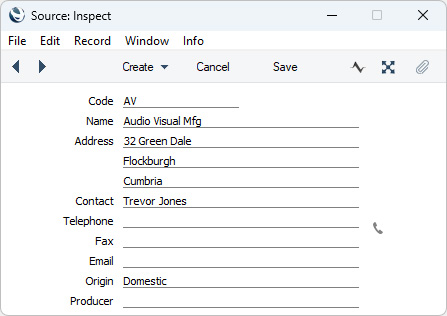
Search HansaManuals.com HansaManuals Home >> Standard ERP >> Stock >> Settings Previous Next Entire Chapter in Printable Form Search This text refers to program version 2026-06-25 Sources This page describes the Sources setting in the Stock module.--- The Sources setting in the Stock module allows you to store the names and addresses of the original producers of the Items that you sell (e.g. the manufacturers, producers or importers). You can enter a Source on the 'Stock' card of each Item record, from where it will be transferred to Orders (flip F) and Deliveries (flip D). The 'Sources: Browse' window lists the Sources that you have already entered: double-click (Windows/macOS) or tap (iOS/Android) to modify or select 'New' from the Create or + menu to create a new record.
IntrastatIf your business is situated in an EU country and its trade with companies in other EU countries is greater than a threshold value, it will be necessary to send Intrastat reports periodically to the relevant authorities. These reports should include the countries of origin of the Items you have purchased and sold during the period. This information will be taken from different parts of the database, depending on how you create your Intrastat reports.The Intrastat functions listed at the end of this paragraph will all take the country of origin of an Item from the third line of the Address in the Source record that is specified as the Default Source in the Item record. If you will use any of these Intrastat functions, you must therefore ensure that each Item has a correctly configured Default Source. The functions that take an Item's country of origin from its Default Source are the Intrastat S/L document in the Sales Ledger and the following export functions in the Purchase and Sales Ledgers: Intrastat P/L (Estonia); Intrastat S/L (Finland); Intrastat P/L (Germany); Intrastat S/L (Germany) and Intrastat S/L (Sweden IDEP-SCB). In addition, the Intrastat P/L (Finland) export will take the country of origin from the Country of Origin field in an Item's Default Purchase Item. If that is blank or an Item does not have a Default Purchase Item, the country of origin will again be taken from the third line of the Address in the Item's Default Source. By default, the Intrastat P/L document in the Purchase Ledger will also take an Item's country of origin from the third line of the Address in its Default Source. However, if you are using the Country of Origin from Goods Receipts option in the Intrastat Purchase setting in the Purchase Ledger, an Item's country of origin will instead be taken from the Country of O. field on flip F of the Goods Receipt row that was used to receive the Item into stock. If you will use this option, you must also use the Transfer Each Row Separately and Invoices Based on Goods Receipts options in the Purchase Invoice Settings setting if you will create Purchase Invoices from Purchase Orders.
Go back to:
|