|
Search HansaManuals.com HansaManuals Home >> Standard ERP >> Stock >> Returned Goods Register Предыдущая Следующая Вариант всей главы для печати Поиск Данный текст относится к версии программы 2026-06-25 Nominal Ledger Transactions from Returns After entering a Returned Goods record and checking that it is correct, you should mark it as OK and save it. A Nominal Ledger Transaction will be generated automatically if you have so determined in the Sub Systems setting in the Nominal Ledger and in the Number Series - Returned Goods setting, and if at least one of the Items on the Return is a Stocked Item (or a Plain or Service Item if you are using the Cost Accounting for Plain and Service Items option in the Cost Accounting setting).The Stock Account debited in this Nominal Ledger Transactions will be determined as follows:
The Cost Account in a Returned Goods record that you create from a Delivery or a Work Sheet will be copied from the corresponding Delivery or Work Sheet row. Otherwise (i.e. in a Returned Goods record that you create from a Sales Order and in a Returned Goods record that you enter directly to the Returned Goods register), this Account will be determined as follows:
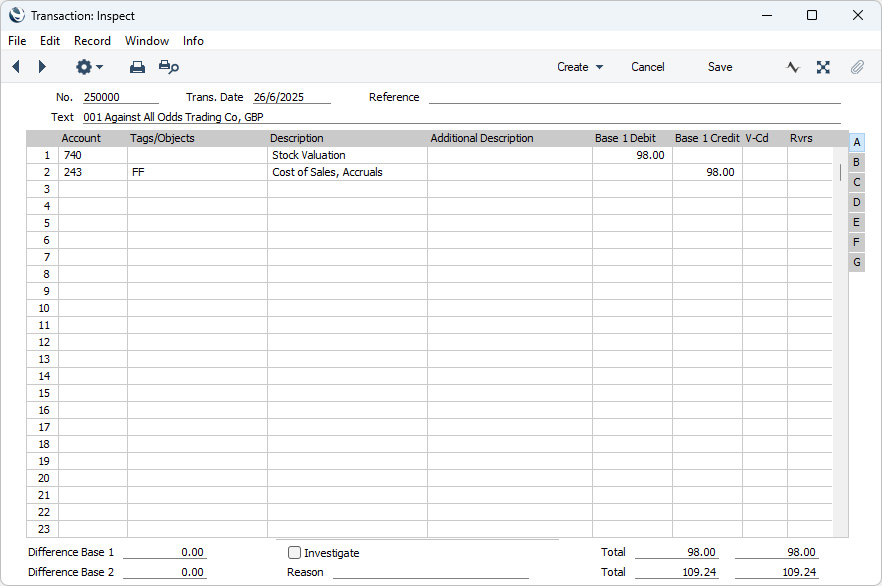
If there are any Extra Costs, these will be posted to the Extra Costs Account specified in the Account Usage Stock setting. Any Tags/Objects in the Return representing the Customer and the Salesman (shown on the 'Terms' card) will be assigned to the credit posting to the Cost of Sales or Returned Goods Account (unless you are using the Skip Header A/C Tags/Objects on Cost A/C option in the Account Usage P/L setting in the Purchase Ledger). The Tags/Objects representing the Item (shown on flip B of the 'Items' card) will also be assigned to the credit posting. Any Tags/Objects specified for the Location will be assigned to the debit posting to the Stock Account. If you are using the Tag/Object on Stock Account option in the Cost Accounting setting, all Tags/Objects in the Return will also be assigned to the debit posting. If you are not using the Tag/Object on Stock Account option and if there are no Tags/Objects specified in the Location, no Tags/Objects will be assigned to postings to the Stock Account unless you have selected the Populate Missing Tags/Objects option in the Account Usage Stock setting. If you are using this option, Tags/Objects specified in the header of the Return but not the row Tags/Objects will be assigned to these postings. If a Returned Goods record contains several Items that use the same Cost of Sales or Returned Goods Account and/or Stock Account and the same Tags/Objects, the resulting Nominal Ledger Transaction can contain separate double-sided postings for each Item, or a single accumulated posting. If you would like to use the first method, select the Separate Transaction rows per Item option in the Cost Accounting setting. Below is shown an example of a Nominal Ledger Transaction created from a Return:
Once the Transaction has been generated, you can look at it straight away using the 'Open NL Transaction' function on the Operations menu (Windows/macOS) or Tools menu (iOS/Android) (subject to access rights set in the Access Groups setting in the System module). --- The Returned Goods register in Standard ERP:
|